
Microsoft
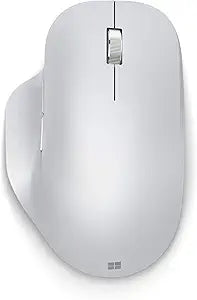
Microsoft 222-00017 Bluetooth Ergonomic Mouse Glacier
Experience All-Day Comfort with the Microsoft Bluetooth Ergonomic Mouse Enhance your productivity and comfort with the Microsoft Bluetooth Ergonomic Mouse. Designed with a comfortable thumb rest and programmable buttons, this wireless mouse provides precise navigation and easy access to your mos...
View on Amazon for pricing
Affiliate Disclosure: As an Amazon Associate, Studio Supplies earns from qualifying purchases made through links on this page, at no additional cost to you. This helps support our editorial team.
Notice a mistake? Let Us Know
Overview
Experience All-Day Comfort with the Microsoft Bluetooth Ergonomic Mouse
Enhance your productivity and comfort with the Microsoft Bluetooth Ergonomic Mouse. Designed with a comfortable thumb rest and programmable buttons, this wireless mouse provides precise navigation and easy access to your most-used features, ensuring a seamless and comfortable workday.
Specifications:
- Connectivity: Bluetooth
- Ergonomics: Comfortable Thumb Rest
- Programmable Buttons: 3
- Battery Life: Up to 15 Months
- Compatibility: Works with Bluetooth-enabled PCs/Laptops, Windows/Mac/Chrome Computers
- Dimensions: 3.91" x 5.46" x 1.85"
Specifications
Connectivity
Bluetooth
Color
Glacier
Design
Ergonomic
Frequently Asked Questions
Is this Microsoft Ergonomic Mouse a wireless device?
Yes, the Microsoft 222-00017 Ergonomic Mouse connects wirelessly via Bluetooth.
What color is the Microsoft Bluetooth Ergonomic Mouse?
The Microsoft Bluetooth Ergonomic Mouse is available in a Glacier finish.
Does this mouse require a USB dongle for connection?
No, this mouse connects directly via Bluetooth, eliminating the need for a separate USB dongle.
Is this mouse designed for ergonomic comfort?
Yes, it is explicitly named an "Ergonomic Mouse," indicating a design focused on comfort during use.
Related Products
