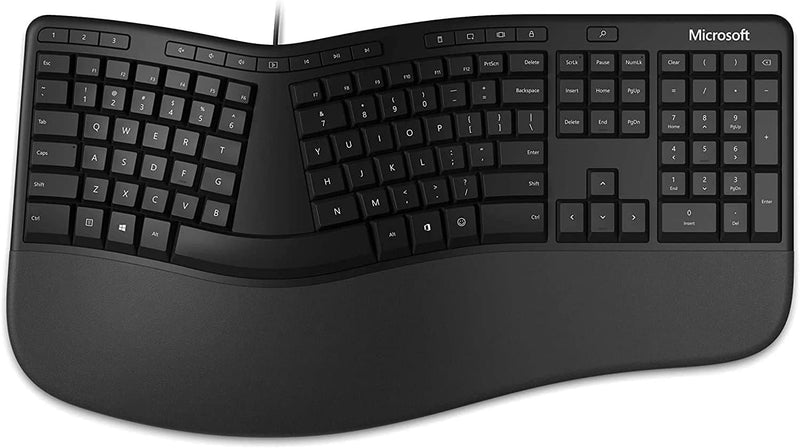
Microsoft

Microsoft 5QH-00001 Ergonomic Keyboard for Business

4.1 (129 reviews)

Microsoft's split ergonomic layout and cushioned palm rest reduce cumulative wrist strain for professionals who type all day.

$309.95*
In Stock on Amazon.com
View on Amazon

*Price sourced from Amazon.com. Last updated:Jul 14, 2026.Price and availability are subject to change.

Affiliate Disclosure: Studio Supplies may earn a commission from qualifying purchases made through links on this page, at no additional cost to you. This helps support our editorial team.

Notice a mistake? Let Us Know

Overview

The Microsoft Ergonomic Keyboard for Business (model LXM-00001 / 5QH-00001) addresses the core biomechanical problem of prolonged keyboard use: unnatural wrist positioning. Its split layout separates the key groups at a gentle angle so each hand rests in a more neutral pronation position, reducing the ulnar deviation stress common to flat keyboards. The cushioned palm rest elevates and supports the heel of each hand, while the palm lift at the front of the keyboard promotes a downward wrist angle that keeps the carpal tunnel decompressed. These aren't marketing claims — they are established ergonomic principles, and Microsoft's execution here is ergonomist-approved. The keyboard is wired, full-size, and includes a number pad, making it a practical daily driver for office and data-entry workloads rather than a specialty peripheral.

This keyboard is built for professionals who log significant daily typing hours and are proactively managing wrist health — or recovering from early-stage repetitive strain. The build is solid for its price tier: keyswitches have consistent tactile feedback, the palm rest retains its cushion over months of use, and the wired connection means zero maintenance overhead. The trade-off is desk real estate — the full ergonomic chassis is noticeably wider and deeper than a standard keyboard. For users on large desks with dedicated keyboard trays, that's a non-issue. For those on cramped workstations, the footprint deserves consideration before purchase.

Key Features

Microsoft Ergonomic Keyboard for Business - Wired LXM-00001

Exceptional comfort. Work all day, with reduced risk of fatigue and injury, on our Ergonomist-approved design.

Cushioned palm rest provides support and promotes a neutral wrist position

Palm lift promotes a relaxed, natural angle for your wrist

Media keys for music and video control

Specifications

Brand
Microsoft
Model Number
5QH-00001
Design
Ergonomic
Connection Type
Wired
Features
Cushioned palm rest, Palm lift, Media keys

Pros & Cons

👍 Pros

  • The split ergonomic layout measurably reduces ulnar deviation, which is the wrist angle that contributes to repetitive strain injuries during long typing sessions.
  • The split key layout positions each hand at a natural angle, reducing ulnar deviation — the lateral wrist bend that accumulates into repetitive strain injury during extended typing sessions.
  • The cushioned palm rest maintains wrist height alignment with the key plane, promoting a neutral wrist posture that reduces flexor tendon pressure compared to typing without palm support.
  • The cushioned palm rest provides consistent wrist support at a neutral position that most users find comfortable across full workdays.
  • The palm lift elevates the rear of the keyboard to promote a downward-angled wrist position — an ergonomically preferred posture for sustained typing.
  • Integrated media keys provide direct music and video playback control without requiring software remapping or reaching for a secondary input device.
  • Wired USB connection eliminates latency variability and battery management — critical for professionals who cannot afford input interruption mid-workflow.
  • Wired USB connectivity eliminates wireless latency variability and battery management overhead in a business workstation context.
  • The integrated media keys provide direct playback and volume control without requiring function-key combinations or additional software.
  • Full-size layout with number pad preserves data-entry efficiency for accounting, spreadsheet, or data-heavy workloads where compact ergonomic keyboards force workflow compromise.

👎 Cons

  • Wired-only connectivity limits cable management flexibility in hot-desking or multi-monitor workstation setups where cord routing is a practical concern.
  • The integrated, non-removable palm rest adds significant desk footprint — the keyboard requires substantially more depth than a standard layout, which constrains desk space on smaller workstations.
  • The split center gap means keys like B, Y, and T fall into an ambiguous zone — users who habitually type these with the wrong hand will need deliberate retraining on the 5QH-00001's layout.
  • The fixed palm rest cannot be detached or repositioned, which means users with non-standard desk heights or hand sizes cannot adjust the support geometry to their specific needs.
  • The split layout requires a meaningful adaptation period — productivity typically drops for one to two weeks during the transition from a standard keyboard, which is a real cost in a business environment.
  • No wireless option exists for this model — the fixed USB cable limits placement flexibility for users who prefer clean desk cable management or multi-device switching.
  • The fixed palm lift angle is not adjustable — users with non-standard wrist geometries or those who prefer a flat typing surface cannot modify the keyboard's incline profile.
  • The keyboard body is physically wider than standard layouts, which can push the mouse to an awkward distance for users with compact desk setups.
  • No programmable keys or remapping software support means power users who rely on macro keys or custom shortcuts won't find that capability here.
  • Media keys lack a dedicated software configuration utility, so remapping them to application-specific functions requires third-party tools or Windows registry workarounds.

Frequently Asked Questions

It is wired only — the 5QH-00001 connects via USB. There is no Bluetooth or wireless variant of this specific Business model. For users who need wireless, Microsoft's Sculpt Ergonomic range offers that option separately.
Wired. The LXM-00001 uses a USB connection — no receiver dongle, no battery to charge, and no Bluetooth pairing complexity. Latency is deterministic and there is no risk of wireless dropout during heavy typing sessions.
Yes. The split ergonomic geometry requires most users to retrain muscle memory over one to two weeks. Touch typists with correct hand positioning adapt faster; hunt-and-peck typists may find the center key division more disorienting.
The split layout separates the key columns at an angle matching natural hand and wrist positioning, reducing ulnar deviation — the sideways wrist bend that contributes to repetitive strain injuries. Most touch typists adapt within one to two weeks; hunt-and-peck typists may find the central key split more disorienting initially.
The cushioned palm rest and palm lift are integrated into the keyboard's fixed body design. They are not detachable or independently adjustable in height.
The palm rest is integrated into the keyboard chassis — it is not detachable. This provides consistent positioning but means you cannot use the keyboard without the full footprint of the rest in front of it.
Yes. The Microsoft Ergonomic Keyboard for Business retains a full-size layout including a number pad on the right side, which distinguishes it from compact split keyboards that sacrifice the numpad for portability.
The keyboard is plug-and-play compatible with Windows. The media keys function correctly on Windows without additional software. Some media key functions may require driver installation for full functionality on macOS or Linux environments.
The media keys on the 5QH-00001 are fixed-function — they control standard media playback, volume, and muting. There is no software layer for remapping them to custom functions within the base product.
The keyboard is designed for Windows and works plug-and-play on Windows 10 and 11. The media keys and function row are fully mapped on Windows. macOS users can operate the keyboard but may find key labeling and some function keys misaligned with macOS shortcuts.