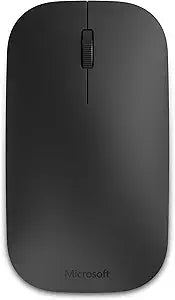
Microsoft 7N5-00001 Designer Bluetooth Mouse
Sleek and Modern Wireless Control The Microsoft Designer Bluetooth Mouse. Connects wirelessly to your laptop or tablet via Bluetooth, offering a clean and modern aesthetic. Specifications: Connectivity: Bluetooth Smart Technology Wireless: Yes
*Price sourced from Amazon.com. Last updated:Jul 14, 2026.Price and availability are subject to change.
Notice a mistake? Let Us Know
Overview
Sleek and Modern Wireless Control
The Microsoft Designer Bluetooth Mouse. Connects wirelessly to your laptop or tablet via Bluetooth, offering a clean and modern aesthetic.
Specifications:
- Connectivity: Bluetooth Smart Technology
- Wireless: Yes
Key Features
Stylish, ultra-thin profile complements your desktop.
Clutter-free and reliable experience utilizing the latest in Bluetooth 4.0 technology.
Microsoft BlueTrack Technology gives you precise control on virtually any surface.
Ambidextrous design to provide comfort and control for either hand.
Specifications
Pros & Cons
👍 Pros
- Its ultra-thin profile and stylish design visually complement a modern desktop setup.
- Connects reliably and without clutter using the latest Bluetooth 4.0 technology, ensuring a clean workspace.
- Equipped with Microsoft BlueTrack Technology, allowing for precise cursor control on a wide variety of surfaces.
- The ambidextrous design provides comfort and responsive control for both left-handed and right-handed users.
- Offers a modern aesthetic while providing essential functionality for daily computing tasks.
👎 Cons
- The mouse relies on Bluetooth 4.0, which means older computers without this specific Bluetooth version may require an adapter.
- While designed for either hand, some users might prefer an ergonomically contoured mouse specifically shaped for one hand.
- The product description does not specify if the mouse has any programmable buttons beyond standard left/right click and scroll.
- Battery type or expected battery life are not mentioned, which could be a consideration for prolonged use.
- There is no mention of DPI settings or sensitivity adjustments, which might be a limitation for detailed work or gaming.