

Microsoft
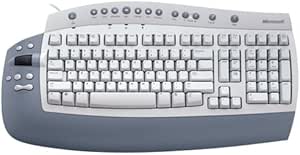
Microsoft E17-00111 Office Keyboard Ergonomic Design
Streamline Your Workflow with Enhanced Control Introducing the Microsoft Office Keyboard. Designed for efficiency and productivity, this keyboard features dedicated shortcut buttons, a unique touchpad, and customizable settings to optimize your Microsoft Office experience. Specifications: Brand...
View price on Amazon
Affiliate Disclosure: As an Amazon Associate, Studio Supplies earns from qualifying purchases made through links on this page, at no additional cost to you. This helps support our editorial team.
Notice a mistake? Let Us Know
Overview
Streamline Your Workflow with Enhanced Control
Introducing the Microsoft Office Keyboard. Designed for efficiency and productivity, this keyboard features dedicated shortcut buttons, a unique touchpad, and customizable settings to optimize your Microsoft Office experience.Specifications:
- Brand: Microsoft
- Model: E17-00111
- Features: Single-touch touchpad, Internet buttons, Scroll wheel, Office hot keys
- Software: IntelliType Pro keyboard software for customization
- Compatibility: Optimized for Microsoft Office products (Excel, Word, Outlook)
- Warranty: Three-year warranty
Key Features
Left-side button pad gives you one-touch access to everyday commands
Scroll wheel offers easy navigation without using the on-screen controls
Includes 12 hot keys for one-touch e-mail, multimedia, and Internet operation
IntelliType Pro software allows customization of hot keys to perform common tasks
Windows and Macintosh compatible
Specifications
Brand
Microsoft
Model
E17-00111 Office Keyboard
Design
Ergonomic
Features
Left-side button pad, Scroll wheel, 12 Hot keys
Software
IntelliType Pro
Compatibility
Windows, Macintosh
Frequently Asked Questions
What is the main advantage of this Microsoft Office Keyboard?
The main advantage is its ergonomic design, which aims to provide a more comfortable typing experience and reduce strain during prolonged use.
Does this keyboard have customizable keys?
Yes, it includes IntelliType Pro software which allows users to customize the hot keys to perform various common tasks, enhancing personal workflow.
How many hot keys are available on this keyboard?
The Microsoft E17-00111 Office Keyboard features 12 hot keys dedicated to one-touch access for email, multimedia functions, and Internet browsing.
Is there a scroll wheel on this keyboard?
Yes, a scroll wheel is integrated into the keyboard, offering easy navigation through documents and web pages without requiring mouse interaction.
Is this keyboard compatible with Mac computers?
Yes, the keyboard is stated to be compatible with both Windows and Macintosh operating systems.
Where are the additional function buttons located on the keyboard?
There is a dedicated left-side button pad that provides one-touch access to everyday commands, designed for convenience.
Related Products


