

Microsoft
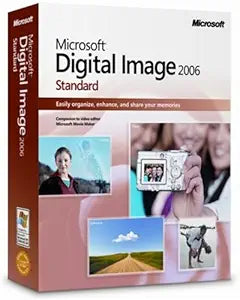
Microsoft FA7-00010 Digital Image Standard 2006
Effortlessly Organize, Enhance, and Share Your Digital Memories Microsoft Digital Image Standard 2006 is designed for new digital photo users who want a simple and effective way to manage their family's memories. With intuitive tools and one-click Auto Fixes, this software makes digital photograp...
Check availability
Affiliate Disclosure: As an Amazon Associate, Studio Supplies earns from qualifying purchases made through links on this page, at no additional cost to you. This helps support our editorial team.
Notice a mistake? Let Us Know
Overview
Effortlessly Organize, Enhance, and Share Your Digital Memories
Microsoft Digital Image Standard 2006 is designed for new digital photo users who want a simple and effective way to manage their family's memories. With intuitive tools and one-click Auto Fixes, this software makes digital photography easy and enjoyable.
Key Features:
- Brand: Microsoft
- Model: FA7-00010
- Software Included: Microsoft Digital Image Pro, Digital Image Library
- Auto Fix Tools: Red eye, color, and exposure correction
- Creative Projects: Access to over 5,000 images for design projects
- Photo Story 2.0: Add music and narration to create DVD photo stories (Windows XP required)
- Sharing Options: E-mail, online print ordering, and Auto Collage for multiple print sizes
Key Features
With Microsoft Digital Image Pro and Digital Image Library included, you can conveniently edit and organize your photos
New autofix tools for red eye, color, and exposure make fixing photos faster than ever
Create a wide range of creative, high-quality photo projects; choose from more than 5,000 images to add to design projects
Photo Story 2.0 lets you add music, narrate your story, and then burn a DVD for playback on your TV (Windows XP required)
Share photos through e-mail, order prints online, or use Auto Collage to print multiple sizes
Specifications
Included Software
Microsoft Digital Image Pro, Digital Image Library
Editing Tools
Autofix for red eye, color, exposure
Design Resources
5,000+ images for projects
Storytelling Feature
Photo Story 2.0 (requires Windows XP)
Sharing Options
Email, Online Prints, Auto Collage
Frequently Asked Questions
What software is included in Microsoft Digital Image Standard 2006?
The suite includes Microsoft Digital Image Pro and Digital Image Library, providing tools for both editing and organizing your photos.
What kind of automatic photo correction features are available?
It offers new autofix tools specifically for red eye, color correction, and exposure adjustment, designed to make fixing common photo issues quicker.
Can I create photo projects with this software?
Yes, you can create a wide range of creative, high-quality photo projects and utilize over 5,000 images included to enhance your designs.
What is Photo Story 2.0 and what are its requirements?
Photo Story 2.0 allows you to add music, narrate your story, and then burn a DVD for playback on your TV. This feature specifically requires Windows XP to function.
How can I share photos using this software?
You can share photos through email, order prints online, or use the Auto Collage feature to print multiple sizes from your images.
Is this software compatible with modern Windows operating systems?
As a 2006 software, Microsoft Digital Image Standard 2006 was designed for older operating systems, particularly noting Windows XP for Photo Story 2.0. Compatibility with newer versions of Windows may vary and is not guaranteed for all features.
Related Products


