



Microsoft
Microsoft Modern USB-C Headset - Certified Teams
USB-C
Stay Connected with Comfort and Clarity The Microsoft Modern USB-C Headset is designed for seamless communication and productivity on your PC, Mac, or Laptop. This wired headset offers comfortable on-ear design, noise-canceling microphone, and convenient in-line controls, making it an essential t...
$57.00*
Check availability
*Price sourced from Amazon.com. Last updated:Oct 18, 2026.Price and availability are subject to change — details.
Affiliate Disclosure: As an Amazon Associate, Studio Supplies earns from qualifying purchases made through links on this page, at no additional cost to you. This helps support our editorial team.
Notice a mistake? Let Us Know
Overview
Stay Connected with Comfort and Clarity
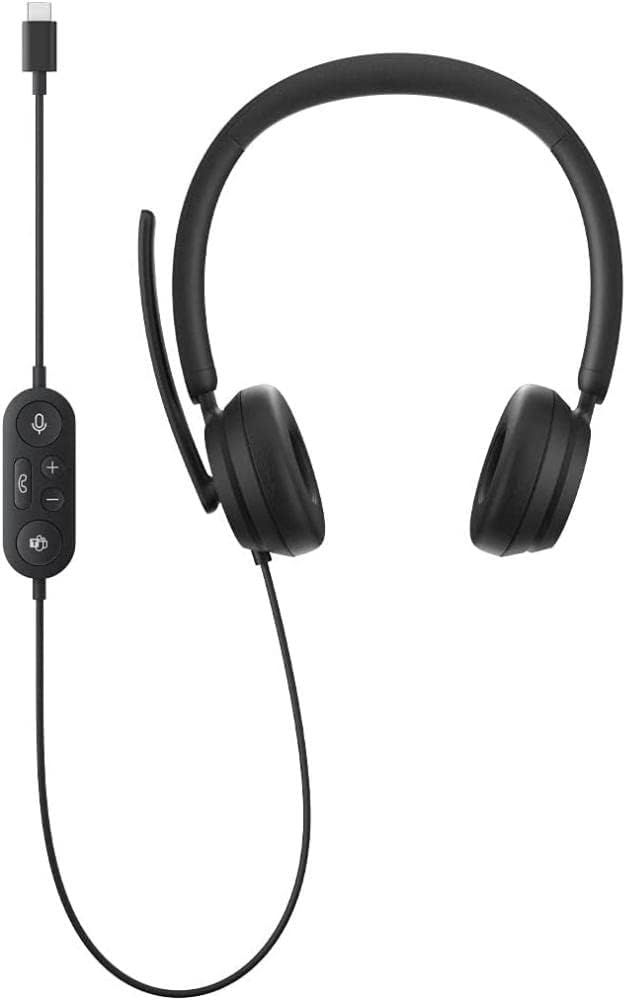
The Microsoft Modern USB-C Headset is designed for seamless communication and productivity on your PC, Mac, or Laptop. This wired headset offers comfortable on-ear design, noise-canceling microphone, and convenient in-line controls, making it an essential tool for calls, meetings, and focused work sessions. Certified for Microsoft Teams ensures optimal performance and integration.
Detailed Specifications:
- Connectivity: USB-C
- Earpiece Design: On-Ear
- Microphone: Noise-Cancelling
- Controls: In-Line (Mute, Volume, Teams button)
- Compatibility: PC, Mac, Laptop
- Color: Black
- Weight: 0.14 Kilograms
- Additional Features: Mute control with status light
Key Features
Comfortable on ear design with lightweight, padded earcups for all day wear.
Background noise reducing microphone.
High-quality stereo speakers optimized for voice.
Mute control with status light. Easily see, at a glance, whether you can be heard or not.
Convenient call controls, including mute, volume, and the Teams button, are in line and easy to reach.
Specifications
Brand
Microsoft
Model Name
Modern USB-C Headset
Connectivity
USB-C
Design
On-ear, Lightweight, Padded Earcups
Microphone
Background Noise Reducing
Speakers
High-Quality Stereo, Optimized for Voice
Controls
In-line Mute Control with Status Light, Volume, Teams Button
Certification
Certified Teams
Frequently Asked Questions
What type of connection does the Microsoft Modern USB-C Headset use?
This headset connects via a USB-C port.
Is the microphone on this headset good at reducing background noise?
Yes, the headset features a background noise-reducing microphone to help ensure clearer communication.
Are the speakers optimized for any specific use?
The high-quality stereo speakers are optimized for voice, making them ideal for calls and conferences.
Does this headset have a mute button?
Yes, it has convenient in-line mute control, which also includes a status light to indicate if you are muted.
Is this headset comfortable for long periods of use?
The headset is designed with comfortable on-ear, lightweight, and padded earcups specifically for all-day wear.
Is this Microsoft headset compatible with Microsoft Teams?
Yes, the Microsoft Modern USB-C Headset is certified for Teams, and includes a dedicated Teams button.
Related Products


