

Microsoft
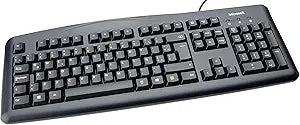
Microsoft JWD-00031 Wired Keyboard 200 - Black USB
Simple, Reliable, and Ready to UseThe Microsoft Wired Keyboard 200 offers a comfortable typing experience with a familiar layout and easy setup. Simply plug it in and start typing. Connection: Wired (USB) Layout: English (US) Color: Black Features: 10-Key Pad, Windows Start B...
Check availability
Affiliate Disclosure: As an Amazon Associate, Studio Supplies earns from qualifying purchases made through links on this page, at no additional cost to you. This helps support our editorial team.
Notice a mistake? Let Us Know
Overview
Simple, Reliable, and Ready to Use
The Microsoft Wired Keyboard 200 offers a comfortable typing experience with a familiar layout and easy setup. Simply plug it in and start typing.
- Connection: Wired (USB)
- Layout: English (US)
- Color: Black
- Features: 10-Key Pad, Windows Start Button
Specifications
Connectivity
Wired
Interface
USB
Color
Black
Frequently Asked Questions
What type of connection does the Microsoft Wired Keyboard 200 use?
The Microsoft Wired Keyboard 200 connects via a wired USB interface.
What color is this keyboard?
This keyboard is black.
Does this keyboard require batteries?
No, as a wired keyboard, it draws power directly from the USB connection and does not require batteries.
Is this a wireless keyboard?
No, this is a wired keyboard, connecting directly to your computer via a USB cable.
Does this keyboard have any special features like backlighting or multimedia keys?
The product description does not specify features like backlighting or dedicated multimedia keys.
Is this keyboard compatible with non-Windows operating systems?
While designed by Microsoft, basic USB keyboards are generally plug-and-play with many operating systems, though specific compatibility is not listed.
Is there a built-in trackpad or mouse functionality with this keyboard?
No, this product is described as a keyboard and does not mention integrated trackpad or mouse functionality.
Related Products


