

Microsoft
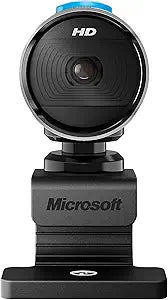
Microsoft MAIN-31891 LifeCam Studio 1080p Webcam
1080p
A 1080p webcam with high-precision glass optics and TrueColor face tracking that brings broadcast-grade clarity to every video call.
$44.73*$64.34Save 30%
View on Amazon
✓ In Stock on Amazon.com
*Price sourced from Amazon.com. Last updated:Aug 30, 2026.Price and availability are subject to change — details.
Affiliate Disclosure: As an Amazon Associate, Studio Supplies earns from qualifying purchases made through links on this page, at no additional cost to you. This helps support our editorial team.
Notice a mistake? Let Us Know
Overview
Key Features
1080p HD video recording
720p HD video chat
High precision glass element lens for sharp image quality
TrueColor Technology with face tracking for bright and colorful video
360° rotation
Specifications
Model
MAIN-31891
Video Recording Resolution
1080p HD
Video Chat Resolution
720p HD
Lens
High-precision glass element
Color Technology
TrueColor with face tracking and light correction
Microphone
Built-in noise-canceling
Rotation
360°
Connectivity
USB
Compatibility
Windows 8/10/11, macOS
Features
Auto-focus, automatic light correction
Frequently Asked Questions
Does the LifeCam Studio record at 1080p for both video calls and local recording?
The LifeCam Studio captures local video recordings at full 1080p HD, but video chat applications are limited to 720p HD output. The resolution cap for live calls is a software-side constraint — most conferencing platforms cap inbound streams regardless, so the 720p call output is the effective ceiling in platforms like Teams and Zoom.
What autofocus system does the LifeCam Studio use, and how does it perform in low-light conditions?
The webcam uses a motorized autofocus with Microsoft's TrueColor Technology, which also applies automatic light correction. In well-lit environments focus is fast and reliable. In dim conditions the face tracking and light correction algorithms compensate, though performance degrades noticeably compared to cameras with larger sensors or manual aperture control.
Is the built-in microphone adequate for professional calls, or is an external mic recommended?
The built-in noise-canceling microphone handles typical office and home environments competently — it suppresses keyboard noise and light ambient sounds. For podcast production, client-facing presentations, or any scenario where audio quality is a differentiator, a dedicated USB or XLR microphone will produce measurably cleaner results.
What operating systems and conferencing platforms are supported?
The LifeCam Studio supports Windows 8, 10, and 11, as well as macOS. It is UVC compliant, which means it functions with Teams, Zoom, Google Meet, and most other major conferencing platforms without driver installation. Microsoft's dedicated LifeCam software extends control options on Windows.
How stable is the mount on different monitor thicknesses?
The 360° rotating clip mount is adjustable and fits most standard monitors and laptop screens. Very thin laptops or unusually thick monitor bezels may require adjustment to achieve a stable, level position — verify the clip fits your specific display before depending on it for critical calls.
Related Products


