



Microsoft
Microsoft PD9-00003 Surface Dock - Black
★★★★★
USB 3.0
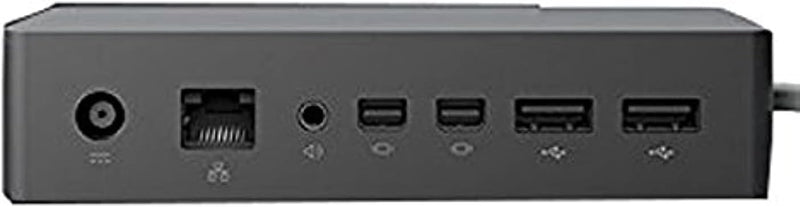
Four USB 3.0 ports and dual display output transform your Surface into a full desktop workstation through a single magnetic connection.
$99.27*$149.00Save 33%
View on Amazon
✓ In Stock on Amazon.com
*Price sourced from Amazon.com. Last updated:Jun 04, 2026.Price and availability are subject to change.
Affiliate Disclosure: Studio Supplies may earn a commission from qualifying purchases made through links on this page, at no additional cost to you. This helps support our editorial team.
Notice a mistake? Let Us Know
Overview
Key Features
Compatibility: Surface go, surface laptop, surface laptop 2, surface pro, surface pro 3, surface pro 4,surface pro 6, surface book, surface book 2
2x Mini display ports, 1x Gigabit Ethernet port
4 USB 3.0 ports, 1x audio out port
Magnetic surface connect cable. Transform your surface into a desktop PC by plugging in your dock with the surface connect cable. External power supply
High speed data transferring
Specifications
Brand
Microsoft
Model
PD9-00003
Connection Interface
Surface Connect (magnetic)
USB Ports
4x USB 3.0
Video Output
2x Mini DisplayPort
Ethernet
1x Gigabit Ethernet
Audio
1x Audio Out
Power
External power supply (charges Surface while docked)
Compatible Devices
Surface Go, Surface Laptop 1/2, Surface Pro 3/4/6, Surface Book 1/2
Color
Black
Pros & Cons
👍 Pros
- Four USB 3.0 ports at 5 Gbps each provide ample bandwidth for external drives, peripherals, and input devices without requiring a separate hub
- Dual Mini DisplayPort outputs enable multi-monitor desktop setups up to 4K resolution, a meaningful productivity multiplier for spreadsheet and development workflows
- Magnetic Surface Connect cable allows one-handed docking and undocking — plug in and your entire desktop peripherals, network, and displays activate simultaneously
- Gigabit Ethernet port delivers reliable, low-latency wired networking that eliminates the inconsistency of Wi-Fi for large file transfers and video conferencing
👎 Cons
- Uses the proprietary Surface Connect interface, limiting compatibility to older Surface models and excluding newer USB-C Surface devices entirely
- Mini DisplayPort outputs require adapters for HDMI or DisplayPort monitors, adding cable clutter and potential points of failure to the desk setup
- No USB-C ports on the dock itself, which means connecting modern USB-C peripherals or drives requires an additional adapter
- The external power supply adds a separate brick and cable to manage, reducing the clean-desk benefit a dock is supposed to provide
Frequently Asked Questions
Which Surface devices does this dock support?
It's compatible with Surface Go, Surface Laptop (1st and 2nd gen), Surface Pro (3, 4, and 6), and Surface Book (1st and 2nd gen). It connects via the proprietary Surface Connect port — devices without this port, including Surface Pro 7 and newer USB-C models, are not supported.
Can I run dual external monitors, and at what resolution?
Yes. The two Mini DisplayPort outputs each support up to 4K resolution. You can run dual 1080p displays without issue, or a single 4K monitor. Driving two 4K displays simultaneously may depend on your specific Surface model's GPU capabilities.
Does the dock charge my Surface while connected?
Yes. The dock provides power through the Surface Connect cable via its external power supply, so your Surface charges while docked. This eliminates the need to use the Surface's own charger at your desk.
What data transfer speeds can I expect from the USB 3.0 ports?
The four USB 3.0 ports deliver up to 5 Gbps per port. That's sufficient for external SSDs, webcams, keyboards, mice, and most peripherals without bandwidth bottlenecks in typical desktop usage scenarios.
Is the Gigabit Ethernet port reliable for wired networking?
Yes. The integrated Gigabit Ethernet port provides a stable, low-latency wired connection at up to 1000 Mbps — a significant upgrade over Wi-Fi for file transfers, video calls, and remote desktop sessions.
Related Products


