

Microsoft
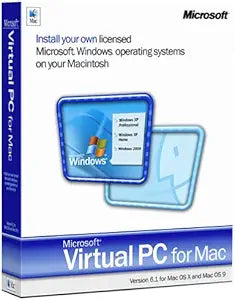
Microsoft S65-00056 Virtual PC for Mac 6.1
Relive the Power of Virtualization on Your Mac Step back in time with Microsoft Virtual PC for Mac 6.1. This classic software empowers you to run Windows operating systems on your Mac, allowing you to access legacy applications and files seamlessly. Note: This is an older version of the software...
$129.00*
Check availability
*Price sourced from Amazon.com. Last updated:Oct 08, 2026.Price and availability are subject to change — details.
Affiliate Disclosure: As an Amazon Associate, Studio Supplies earns from qualifying purchases made through links on this page, at no additional cost to you. This helps support our editorial team.
Notice a mistake? Let Us Know
Overview
Relive the Power of Virtualization on Your Mac
Step back in time with Microsoft Virtual PC for Mac 6.1. This classic software empowers you to run Windows operating systems on your Mac, allowing you to access legacy applications and files seamlessly. Note: This is an older version of the software.
Specifications:
- Brand: Microsoft
- Model: S65-00056
- Title: Microsoft Virtual PC for Mac 6.1 [Old Version]
- Description: Enables Windows OS virtualization on Mac.
Specifications
Brand
Microsoft
Product Name
Virtual PC for Mac
Version
6.1
Operating System Compatibility (Host)
Mac
Function
Runs Windows on Mac
Frequently Asked Questions
What is the primary function of Microsoft Virtual PC for Mac 6.1?
Microsoft Virtual PC for Mac 6.1 allows users of Apple Macintosh computers to run Windows operating systems and their associated applications within a virtualized environment directly on their Mac.
Is this software compatible with current versions of macOS?
Given that Virtual PC for Mac 6.1 is an older release, it is unlikely to be fully compatible with contemporary macOS versions, and it is primarily designed for older Mac operating systems.
How does this software run Windows on a Mac?
Virtual PC for Mac creates a virtual machine, which functions as a simulated computer within your Mac's operating system, allowing you to install and run Windows without needing to restart your computer.
Can I run any Windows application with Virtual PC for Mac 6.1?
The software enables the running of many Windows applications, though compatibility and performance will depend on the specific Windows OS installed in the virtual machine and the application's requirements.
Does running Windows in a virtual machine impact Mac performance?
Yes, running a virtual machine requires system resources like CPU and RAM from your Mac, which can potentially lead to some performance impact on the host macOS, especially with resource-intensive virtualized applications.
Related Products


