

Microsoft
Microsoft S65-00399 Virtual PC Mac 7.0 XP Pro
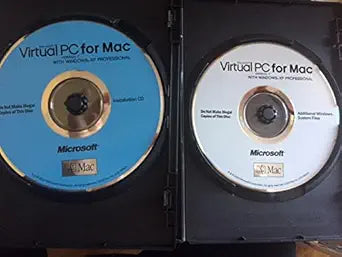
Run Windows on Your Mac: Microsoft Virtual PC 7.0 Microsoft Virtual PC for Mac 7.0 allows you to run Windows applications on your Mac. Comes complete with a Microsoft Windows XP Professional Installation CD and additional Windows System Files. Specifications: Software: Virtual PC for Mac 7.0...
Check availability
Affiliate Disclosure: As an Amazon Associate, Studio Supplies earns from qualifying purchases made through links on this page, at no additional cost to you. This helps support our editorial team.
Notice a mistake? Let Us Know
Overview
Run Windows on Your Mac: Microsoft Virtual PC 7.0
Microsoft Virtual PC for Mac 7.0 allows you to run Windows applications on your Mac. Comes complete with a Microsoft Windows XP Professional Installation CD and additional Windows System Files.
Specifications:
- Software: Virtual PC for Mac 7.0
- Operating System: Microsoft Windows XP Professional
- Includes: Installation CD, Additional Windows System Files
Specifications
Software Title
Virtual PC Mac
Version
7.0 XP Pro
Brand
Microsoft
Platform
Mac
Virtualized OS
Windows XP Pro
Frequently Asked Questions
What is the primary function of Microsoft Virtual PC Mac 7.0 XP Pro?
The primary function of this software is to enable Mac users to run Windows XP Professional applications within a virtualized environment on their Mac computer.
What operating system is emulated by this software?
This specific version of Virtual PC Mac is designed to emulate Windows XP Professional.
Is this software compatible with the latest macOS versions?
Given that it's version 7.0 XP Pro, it's an older product and may not be fully compatible or function optimally with the newest macOS operating systems.
Can I run other versions of Windows besides XP Pro with this software?
Microsoft Virtual PC Mac 7.0 XP Pro is specifically named for Windows XP Pro, indicating it is optimized for, and likely limited to, that particular Windows version.
Is a physical copy of Windows XP Pro required to use this software?
Virtual PC software typically requires a valid license and installation media for the guest operating system (in this case, Windows XP Pro) to be installed within the virtual machine.
Related Products


