
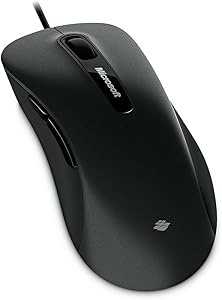
Microsoft S7J-00001 Comfort Mouse 6000 - Right-Handed
Ergonomic Comfort for All-Day UseThe Microsoft Comfort Mouse 6000 offers a comfortable and precise computing experience. Designed for right-handed users, this mouse features BlueTrack Technology for reliable tracking on virtually any surface, along with customizable buttons to enhance your produc...
Check availabilityNotice a mistake? Let Us Know
Overview
Ergonomic Comfort for All-Day Use
The Microsoft Comfort Mouse 6000 offers a comfortable and precise computing experience. Designed for right-handed users, this mouse features BlueTrack Technology for reliable tracking on virtually any surface, along with customizable buttons to enhance your productivity.
- Hand Orientation: Right-Handed
- Technology: BlueTrack
- Buttons: 5 Customizable Buttons
Key Features
Right-handed control - Your right hand will shift your laptop into high gear.
Five customizable buttons - Do more and get it done faster.
BlueTrack Technology - Works on virtually any surface, from the hood of a car, carpets, to park benches.
Detent scroll wheel - Effortless comfort and accuracy.
Specifications
Frequently Asked Questions
Related Products
