



Microsoft
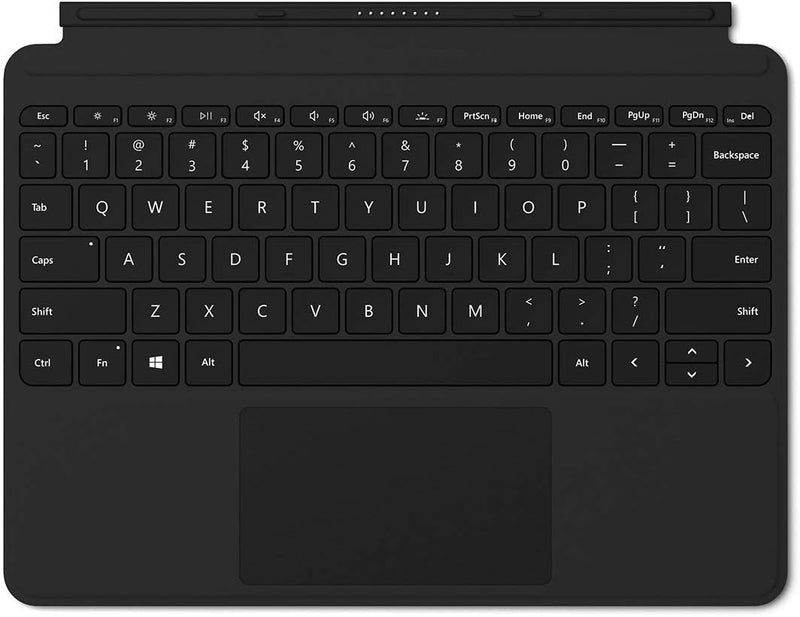
Microsoft Surface Go Type Cover - Black (Renewed)
Full mechanical keys and a precision glass trackpad transform the Surface Go into a laptop-class input experience — in a form factor that snaps on magnetically.
View price on Amazon
Affiliate Disclosure: As an Amazon Associate, Studio Supplies earns from qualifying purchases made through links on this page, at no additional cost to you. This helps support our editorial team.
Notice a mistake? Let Us Know
Overview
Key Features
Features a full mechanical keyset, backlit keys, and extra-large trackpad for precise navigation and control. Slim and compact, yet performs like a traditional, full-size keyboard.
Clicks in place instantly — use in combination with Surface Go Kickstand for a best-in-class laptop experience anywhere. (Kickstand Sold Separately).
Close to protect screen and conserve battery, or fold back completely for a take-anywhere tablet.
Complement your style with a black color type cover. Microsoft Surface Go, Mobile Mouse, Pen and Arc Mouse all Sold Separately.
Includes Mechanical Click-Pad, Backlit Keys, Windows Key and Dedicated Media Control Buttons.
Specifications
Compatibility
Microsoft Surface Go
Keyset
Full mechanical keyset
Backlight
Yes (backlit keys)
Trackpad
Extra-large glass trackpad (Windows Precision Touchpad)
Special Keys
Windows Key, dedicated media control buttons
Connection
Magnetic Surface connector (data + power, no Bluetooth)
Color
Black
Condition
Renewed (refurbished)
Model
Surface Go Type Cover
Frequently Asked Questions
Which Surface Go generations does this Type Cover physically fit?
This Type Cover is compatible with the original Microsoft Surface Go. Surface Go 2 and Go 3 use a physically compatible connector, but Microsoft's official compatibility list should be verified before purchase — this renewed unit is listed for Surface Go.
Does the backlit keyboard work at all brightness levels without draining battery significantly?
Keyboard backlighting on Surface Type Covers does introduce additional power draw, which is drawn from the Surface tablet's battery via the magnetic cover connector. For extended low-light typing sessions, backlighting at minimum brightness is the most efficient setting — maximum brightness will measurably accelerate battery drain relative to backlight-off operation.
What does "Renewed" mean for this product, and what condition should I expect?
Renewed indicates this is a refurbished unit — inspected, tested, and certified to function as new. Cosmetic condition varies by renewal grade. Mechanical key function and trackpad performance should meet original spec, but minor surface wear on keycaps or the fabric exterior may be present depending on the specific unit.
Does the trackpad support multi-touch gestures for Windows navigation?
Yes. The Type Cover's glass trackpad supports Windows Precision Touchpad drivers, enabling two-finger scroll, three-finger app switching, pinch-to-zoom, and other Windows 10/11 multi-touch gestures natively, without additional driver installation.
Can the Type Cover be used folded back in tablet mode without triggering accidental keystrokes?
Yes. The Type Cover is designed to fold flat against the back of the Surface Go, at which point the keyboard input is automatically disabled. This allows full tablet use without keyboard interference.
Related Products

