

Microsoft
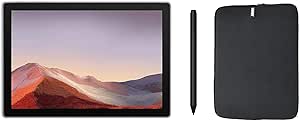
Microsoft Surface Pro 7 Touchscreen Tablet PC Bundle
1080p4K2736x1824USB-C8MP
Versatile Performance in a Sleek Design: The Microsoft Surface Pro 7The Microsoft Surface Pro 7 delivers a powerful and adaptable 2-in-1 experience. Seamlessly transition between a premium laptop and a portable tablet. Ideal for professionals and creatives seeking performance and flexibility. Key...
Check availability
Affiliate Disclosure: As an Amazon Associate, Studio Supplies earns from qualifying purchases made through links on this page, at no additional cost to you. This helps support our editorial team.
Notice a mistake? Let Us Know
Overview
Versatile Performance in a Sleek Design: The Microsoft Surface Pro 7
The Microsoft Surface Pro 7 delivers a powerful and adaptable 2-in-1 experience. Seamlessly transition between a premium laptop and a portable tablet. Ideal for professionals and creatives seeking performance and flexibility.
Key Features:- Processor: Intel 11th Generation Core i3
- Memory: 8GB RAM
- Storage: 128GB SSD
- Display: 12.3" (2736 x 1824) PixelSense 10-Point Touch Display
- Operating System: Windows 11 Home
- Included: Surface Pen & Woov Laptop Sleeve
- Video: Intel HD Graphics Series
- Audio: HD Audio with Stereo Speakers
- Ports: 1 x USB 3.1 Type-C, 1 x USB 3.1 Type-A, 1 x Mini DisplayPort, 1 x 1/8" (3.5 mm) Headphone/Microphone
- Wireless Connectivity: 802.11 a/b/g/n/ac, Bluetooth 5.0
- Webcam: 8.0 MP Rear-Facing Camera, 5.0 MP Front-Facing Camera
- Micro Card Reader: Yes
- Color: Platinum
- Dimensions: 11.50" x 7.90" x 0.33"
- Weight: 1.7 Lbs
Key Features
Surface Pro 7+ powered by a Intel Core i5 processor and over two times faster than Surface Pro 6 | Versatile Kickstand adjusts nearly 180 degrees | Front-facing 5.0 megapixel 1080p HD camera, 8MP rear-facing camera with autofocus, and dual far-field Studio Mics – ready wherever and whenever you need them.
12.3” PixelSense Display with 2736x1824 resolution. 12.3” PixelSense Display provides the ultimate interactive experience anywhere. Plus, Surface signature 3:2 aspect ratio means 18% more vertical screen real estate than a typical laptop.
With multitasking speed, improved graphics, amazing entertainment, quality Wi-Fi performance, and 15 hours' of long battery life life. The high-resolution PixelSense display with ambient light sensing automatically adjusts to lighting conditions.
More ports give you more options. Power multiple 4K external displays, use your favorite hard-wired headphones, or even charge your phone with USB-A, USB-C, headphone jack, and a dedicated charging port
Windows 11 Home brings you closer to what you love. Family, friends, passions, music, creations – Windows 11 is the one place for it all. With a fresh new feel and tools that make it easier to be efficient, it has what you need for whatever’s next.
Specifications
Processor
Intel Core i5
Display Size
12.3”
Display Resolution
2736x1824
Display Type
PixelSense Display
Operating System
Windows 11 Home
Front Camera
5.0 megapixel 1080p HD
Rear Camera
8MP with autofocus
Microphones
Dual far-field Studio Mics
Battery Life
15 hours
Ports
USB-A, USB-C, Headphone Jack, Dedicated Charging Port
Frequently Asked Questions
What processor powers this Microsoft Surface Pro 7+ tablet?
This Microsoft Surface Pro 7+ is powered by an Intel Core i5 processor, offering performance that is over two times faster than the Surface Pro 6.
What is the screen size and resolution of the PixelSense Display?
It features a 12.3” PixelSense Display with a high resolution of 2736x1824, providing a clear and vibrant visual experience.
How long does the battery typically last on a single charge?
The Microsoft Surface Pro 7+ offers up to 15 hours of long battery life, designed for extended use throughout the day.
What operating system comes pre-installed on this Surface Pro 7+?
This Surface Pro 7+ tablet bundle comes with Windows 11 Home pre-installed, offering the latest features and user interface.
Does the Surface Pro 7+ have cameras for video calls and photos?
Yes, it includes a front-facing 5.0 megapixel 1080p HD camera and an 8MP rear-facing camera with autofocus, along with dual far-field Studio Mics.
What types of ports are available on this Surface Pro 7+ for connectivity?
The Surface Pro 7+ features versatile connectivity with USB-A, USB-C, a headphone jack, and a dedicated charging port.
Can the Kickstand adjust to different viewing angles?
Yes, the versatile Kickstand on the Surface Pro 7+ adjusts nearly 180 degrees, allowing for a wide range of viewing and typing positions.
Related Products


