Microsoft

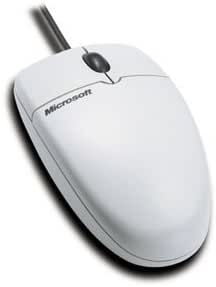
Microsoft Wheel Mouse PS/2 Wired Mouse

2.5 (3 reviews)

Simple, Reliable Navigation at Your FingertipsIntroducing the Microsoft Wheel Mouse PS/2. Enjoy smooth and effortless scrolling with this classic, easy-to-use mouse, designed for reliability and affordability. Interface: PS/2 Scrolling: Wheel

Check availability
Affiliate Disclosure: Studio Supplies may earn a commission from qualifying purchases made through links on this page, at no additional cost to you. This helps support our editorial team.

Notice a mistake? Let Us Know

Overview

Simple, Reliable Navigation at Your Fingertips

Introducing the Microsoft Wheel Mouse PS/2. Enjoy smooth and effortless scrolling with this classic, easy-to-use mouse, designed for reliability and affordability.

  • Interface: PS/2
  • Scrolling: Wheel

Key Features

Just plug Wheel Mouse into a PS/2 port, and it's ready to use. To take advantage of Wheel Mouse scroll-wheel features, simply install the included IntelliPoint software

Roll the wheel forward or backward instead of clicking on a scroll bar or arrow for a fast and easy way to move through your documents

Built to meet strict standards, Wheel Mouse is solid and reliable

Just what you'd expect from a Microsoft product

Scroll Wheel

Specifications

Product Type
Wheel Mouse
Connectivity
Wired
Interface
PS/2
Features
Scroll Wheel

Pros & Cons

👍 Pros

  • This Microsoft Wheel Mouse is designed for simple plug-and-play use by connecting directly to a PS/2 port.
  • The included scroll wheel allows for fast and easy navigation through documents without clicking scroll bars.
  • The mouse is described as solid and reliable, meeting strict standards for dependability.
  • Installation of the included IntelliPoint software unlocks additional scroll-wheel features for enhanced functionality.
  • Its wired connection ensures a consistent and uninterrupted experience, free from battery concerns or wireless interference.

👎 Cons

  • This mouse connects via a PS/2 port, which is an older connection type not commonly found on modern computers.
  • The design may be basic, lacking advanced ergonomic features or programmable buttons found in more contemporary mice.
  • Being a wired mouse, it requires a physical connection to the computer, potentially limiting placement flexibility.
  • The IntelliPoint software, while offering features, requires installation, which might not be desirable for all users.
  • The product does not specify the sensor type (e.g., optical, laser), which can impact precision on various surfaces.

Frequently Asked Questions

You simply plug the Microsoft Wheel Mouse into a PS/2 port, and it is ready to use.
The mouse is ready to use by plugging it in, but to take advantage of its scroll-wheel features, you can install the included IntelliPoint software.
The scroll wheel allows you to roll forward or backward through documents, providing a fast and easy way to navigate without clicking scroll bars.
No, the Microsoft Wheel Mouse is a wired mouse that connects via a PS/2 port.
This mouse uses a PS/2 port, which is an older connection type; modern computers typically use USB, so an adapter would be needed.
It is described as solid and reliable, built to meet strict standards for durability.