


Microsoft
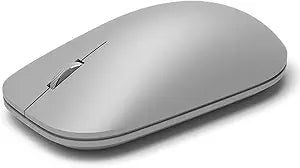
Microsoft WS3-00001 Bluetooth Surface Mouse
Bluetooth 4.0
Bluetooth 4.0 wireless and a sculpted ergonomic form factor deliver precise, cable-free control optimized for Surface ecosystem workflows.
View price on Amazon
Affiliate Disclosure: As an Amazon Associate, Studio Supplies earns from qualifying purchases made through links on this page, at no additional cost to you. This helps support our editorial team.
Notice a mistake? Let Us Know
Overview
Key Features
Compatible with Windows 10 / 8. 1 / 8 and Windows RT 8.1 / RT 8, Mac OS X v10.10.5 / 10.11.1 / 10.11.4, Microsoft Windows 10 phone, Android 4.4.2-5.0
Sleek and simple design
Metal scroll wheel
Host must support Bluetooth 4.0 or higher
Specifications
Connectivity
Bluetooth 4.0 (no dongle)
Scroll Wheel
Metal
Design
Ergonomic, right-hand sculpted
Compatible OS
Windows 10/8.1/8/RT, macOS X 10.10.5–10.11.4, Android 4.4.2–5.0, Windows 10 Mobile
Bluetooth Requirement
Host must support Bluetooth 4.0 or higher
Model
WS3-00001
Brand
Microsoft
Frequently Asked Questions
Does the Microsoft Surface Mouse require a USB dongle, or does it pair directly via Bluetooth?
It pairs directly via Bluetooth 4.0 — no USB dongle required. Your system must have a Bluetooth 4.0 or higher radio. This preserves your USB ports, which is a meaningful advantage on Surface devices with limited port counts.
What operating systems is the Surface Mouse compatible with beyond Windows?
The Surface Mouse supports Windows 10, 8.1, and 8 (including RT variants), Mac OS X 10.10.5 and later (through 10.11.4 at the time of specification), Android 4.4.2–5.0, and Windows 10 Mobile. Functionality may be limited on non-Windows platforms — advanced button remapping and Microsoft Mouse settings are Windows-only.
What type of batteries does the Surface Mouse use and what is the expected battery life?
The Surface Mouse uses standard AA batteries. Battery life specifics are not detailed in the product listing — Microsoft's typical guidance for Bluetooth mice in this family is several months of normal use. Having a spare set of AA batteries on hand is advisable for travel or extended work sessions.
Does the metal scroll wheel on the Surface Mouse support free-spin or tilt-click functionality?
The metal scroll wheel provides standard vertical scrolling. The product specifications do not indicate free-spin or horizontal tilt-click capability — it functions as a standard scroll wheel with a center click. The metal finish provides a more tactile, premium feel compared to rubber-coated wheels.
Can I pair the Surface Mouse with multiple devices and switch between them?
The Surface Mouse does not feature multi-device Bluetooth pairing — it maintains a single paired connection. Switching between devices requires manually unpairing and re-pairing via Bluetooth settings on each host. Users who need multi-device switching should consider mice with explicit multi-device pairing buttons.
Related Products
