



Monoprice
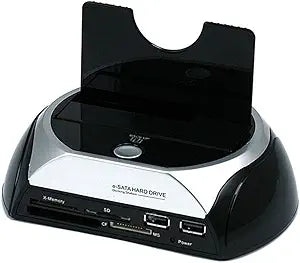
Monoprice 106630 SATA HDD Docking Station USB Hub
Monoprice docking station gives instant access to bare SATA drives with a built-in card reader and USB hub.
Check availability
Affiliate Disclosure: As an Amazon Associate, Studio Supplies earns from qualifying purchases made through links on this page, at no additional cost to you. This helps support our editorial team.
Notice a mistake? Let Us Know
Overview
Key Features
Hard disk docking station combo supports all 2.5-inch and 3.5-inch HDDs up to 2TB.
You can quickly access multiple HDDs without having to power down or reboot
It is compatible with both Windows and Mac computers
Specifications
Brand
Monoprice
Model
106630
Drive Compatibility
2.5" and 3.5" SATA HDDs up to 2TB
USB Interface
USB 2.0 (up to 480 Mbps)
eSATA Interface
Up to 3 Gbps
Card Reader
34 memory card formats supported
USB Hub
2-port USB 2.0
Features
Hot-swappable, one-touch backup
OS Compatibility
Mac OS X, Windows 95+
Frequently Asked Questions
What size and type of hard drives does this docking station support?
It accepts both 2.5-inch and 3.5-inch SATA hard drives with capacities up to 2TB, making it compatible with standard laptop and desktop drives.
Can I connect the dock using eSATA and USB at the same time?
No. You use either the USB 2.0 or eSATA connection to link the dock to your computer — one interface at a time for the drive connection.
What types of memory cards does the built-in card reader support?
The card reader supports 34 different memory card formats, covering the most common types including SD, microSD, CF, and Memory Stick variants.
Does the dock support hot-swapping drives?
Yes. The dock is hot-swappable, meaning you can insert and remove SATA drives without powering down the dock or your computer.
Is the one-touch backup feature software-dependent?
Yes. The one-touch backup button works in conjunction with backup software that is typically included with the dock, allowing you to initiate a backup to the docked drive with a single press.
Related Products

