

Monoprice
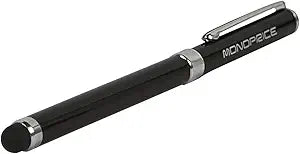
Monoprice 109244 Ink Pen/Stylus for Touchscreen Devices
Versatile 2-in-1 Ink Pen and StylusThe Monoprice Ink Pen/Stylus is a convenient tool for touch screen devices. Combining a ballpoint pen and a capacitive stylus, this device allows you to seamlessly switch between writing on paper and navigating your iPad, iPhone, or Android device. Specification...
Check availability
Affiliate Disclosure: As an Amazon Associate, Studio Supplies earns from qualifying purchases made through links on this page, at no additional cost to you. This helps support our editorial team.
Notice a mistake? Let Us Know
Overview
Versatile 2-in-1 Ink Pen and Stylus
The Monoprice Ink Pen/Stylus is a convenient tool for touch screen devices. Combining a ballpoint pen and a capacitive stylus, this device allows you to seamlessly switch between writing on paper and navigating your iPad, iPhone, or Android device.
Specifications:
- Brand: Monoprice
- Model: 109244
- Type: Ink Pen/Stylus
- Ink Color: Black
- Tip Material: Rubber
- Body Material: Aluminum
- Color: Black
Key Features
Do you want a stylus for your touch screen device, but don't want to have to carry around an extra pen in your pocket? If so, this combination Ink Pen/Stylus from Monoprice is just what you need
The pen/stylus has an ink pen under the cap and a soft, slick, rubber tip at the other end
The rubber tip is designed to provide the electrical conductivity necessary to activate a capacitive touch screen in the same way as that of a human finger
Specifications
Type
Ink Pen/Stylus Combination
Stylus Tip Material
Soft, Slick Rubber
Touchscreen Compatibility
Capacitive Touchscreens
Frequently Asked Questions
What devices are compatible with the Monoprice Ink Pen/Stylus?
This stylus is designed to work with capacitive touchscreens, which include most modern smartphones, tablets, and other touch-enabled devices.
How does the stylus interact with touchscreens?
The stylus features a soft, slick rubber tip that provides the electrical conductivity required to activate a capacitive touch screen, similar to a human finger.
Is there an ink pen included, or is it just a stylus?
Yes, this is a combination device; it includes an ink pen located under the cap, in addition to the touchscreen stylus on the opposite end.
Does the stylus require batteries to function?
No, the stylus does not require any batteries as it relies on the natural electrical conductivity of its rubber tip to interact with capacitive touchscreens.
How do I access the ink pen function?
To use the ink pen, you simply need to remove the cap, which covers the writing end of the pen.
Related Products

