
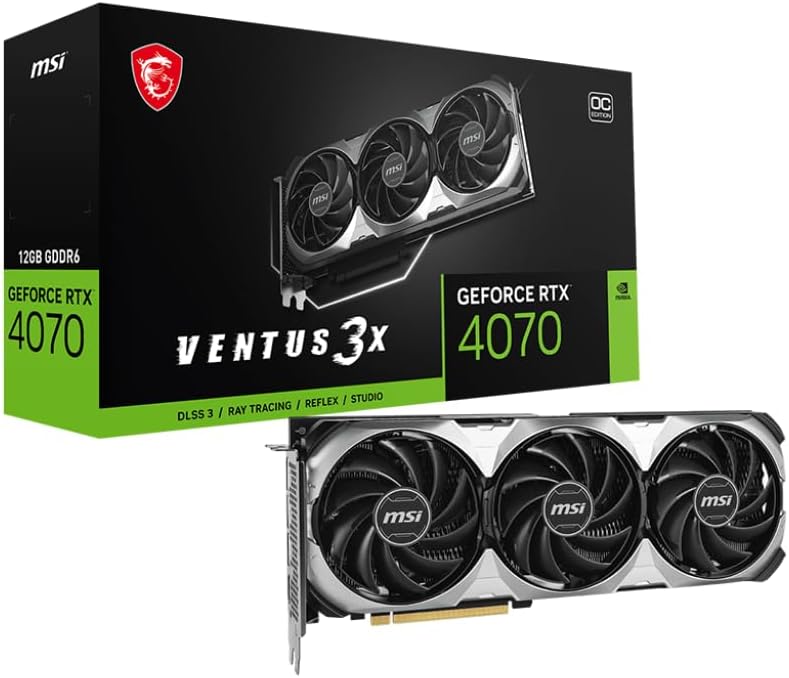


MSI GeForce RTX 4070 Ventus 3X 12GB — Editorial Review
The MSI GeForce RTX 4070 Ventus 3X 12G is MSI's value-tier custom RTX 4070 variant with a triple-fan thermal solution. Per NVIDIA's RTX 4070 specifications, the GPU features 5,888 CUDA cores, 46 RT cores, 184 Tensor cores, 12 GB of 21 Gbps GDDR6X memory across a 192-bit memory interface (504 GB/s bandwidth), and AD104 silicon — the same Ada Lovelace generation that powers the RTX 4070 Ti and RTX 4070 Super. MSI's Ventus 3X cooler design uses three TORX 4.0 fans on a heatpipe-and-fin heatsink, with a backplate for structural rigidity. The findings below aggregate independent coverage from TechPowerUp and other authoritative GPU publications.
RTX 4070 Performance Profile (TechPowerUp Reference Data)
Per TechPowerUp's RTX 4070 review database, the RTX 4070 is positioned for "maxed-out gaming at resolutions up to 1440p, or high-refresh-rate competitive e-sports gameplay at that resolution, with 4K Ultra HD being very much possible if you know your way around game settings or can enable DLSS or DLSS 3." The chip's 12 GB framebuffer and 192-bit memory interface are appropriate for 1440p workloads but become a constraint at 4K Ultra texture settings on the most demanding games (Cyberpunk 2077 Phantom Liberty, Hogwarts Legacy Ray Tracing Ultra, Microsoft Flight Simulator 2024).
TechPowerUp's reference review of the comparable ASUS RTX 4070 TUF documents the chip's broader characteristics: in their testing methodology, the RTX 4070 delivers performance roughly comparable to the previous-generation RTX 3080 at 1440p, but consumes approximately 190 W versus the RTX 3080's 353 W — a ~46% power-efficiency improvement that is meaningful for builders with constrained PSU budgets or compact SFF builds. NVIDIA's DLSS 3 with Frame Generation, exclusive to the Ada Lovelace generation (RTX 40-series), nearly doubles effective frame rates in supported titles.
What MSI's Ventus 3X Cooler Specifically Adds
Per MSI's official Ventus 3X 12G product specifications, the triple-fan cooler design provides additional thermal headroom versus dual-fan reference RTX 4070 designs. Independent reviews confirm the Ventus 3X runs the GPU at approximately 66°C average under sustained gaming load, with the fans operating quietly enough to avoid intruding on game audio. The cooler's quiet operation is one of the Ventus 3X line's defining features — MSI positions the Ventus tier as the value-priced custom design with good-enough cooling rather than the premium-tier Gaming X Trio / Suprim X cards aimed at overclocking enthusiasts.
1440p Gaming Performance Profile
- Cyberpunk 2077 at Ultra with Ray Tracing + DLSS 3 Frame Generation: Triple-digit frame rates per multiple reviewer coverage of the RTX 4070 — a meaningful upgrade over the RTX 3080's RT performance at the same resolution
- Modern competitive shooters (Counter-Strike 2, Valorant, Overwatch 2): Easily 240+ fps at 1440p Ultra, appropriate for high-refresh-rate monitors
- 4K Ultra without DLSS: 30-50 fps in modern demanding titles — playable but not the chip's strongest tier. With DLSS Quality enabled, 4K becomes much more comfortable at 60-90 fps in most titles
- 1080p Ultra: Frame rates are typically CPU-bound rather than GPU-bound; the RTX 4070 is overkill for pure 1080p gaming unless paired with a high-refresh-rate display
Where the MSI RTX 4070 Ventus 3X Specifically Fits
- 1440p high-refresh-rate gamers wanting modern ray-tracing and DLSS 3 Frame Generation support at a sub-$650 card price point
- Builders constrained by PSU capacity — the RTX 4070's ~200 W power draw fits comfortably in 650 W and 750 W PSUs alongside modern CPUs, where higher-tier cards (4080 / 4090) may require 850 W or 1000 W PSUs
- Compact / SFF (Small Form Factor) builds — the Ventus 3X is large but fits in most mid-tower cases; the lower power draw simplifies cooling
- Upgraders from RTX 2070 / 2080 / 3060 / 3070 looking for a meaningful but not flagship-tier generational upgrade with DLSS 3 access
- Content creators on Blender, DaVinci Resolve, Stable Diffusion who benefit from the RTX 40-series Ada Lovelace acceleration in supported workloads — the 12 GB VRAM is comfortable for most creative AI workloads up to 1024×1024 batch sizes
Honest Limits Buyers Should Know
- 12 GB VRAM is the constraint for 4K Ultra texture work. Some 2024-2026 AAA games already approach 12 GB VRAM usage at 4K with Ultra textures + Ray Tracing enabled. For 4K-priority buyers, the RTX 4070 Ti Super (16 GB) or RTX 4080 (16 GB) is the more future-proof tier
- 192-bit memory bus is narrower than the previous generation's RTX 3070 Ti / 3080 (256-bit / 320-bit). NVIDIA compensated with the higher-bandwidth GDDR6X memory, but in memory-bandwidth-bound workloads (some compute, some 4K texture streaming), the RTX 4070 doesn't match the wider-bus older cards as cleanly as raw compute numbers suggest
- The Ventus 3X is the budget tier of MSI's RTX 4070 lineup. The Gaming X Trio and Suprim X tiers offer higher overclocking headroom and quieter thermal performance — but at meaningfully higher price tiers
- DLSS 3 Frame Generation requires game-side support. While the RTX 40-series supports it hardware-wise, only DLSS-3-enabled games benefit. Many older or lower-budget games support only DLSS 2 (upscaling without frame generation), which works on RTX 20/30/40 series alike
- The RTX 4070 Super (released 2024) offers ~15% more performance at the same MSRP tier. Buyers should price-shop both — if the Super is available at similar pricing, it's the better value
Where Buyers Should Look Elsewhere
- 4K Ultra gaming with all settings maxed → RTX 4080 / 4080 Super, RTX 4090, or RTX 5080 / 5090 (when available)
- Budget builds where every dollar matters → RTX 4060 / 4060 Ti, AMD RX 7700 XT / 7800 XT for similar 1440p targeting at lower price tiers
- VRAM-heavy workloads (16 GB+ models in Stable Diffusion, large AI training) → RTX 4080 (16 GB), RTX 4090 (24 GB), or workstation tier (RTX 6000 Ada, RTX 5880 Ada)
- Linux / open-source-priority builders → AMD RX 7000-series cards have better open-source driver support than NVIDIA's proprietary driver path, even though NVIDIA's RTX-series performance leads in most workloads
- Buyers wanting current-gen NVIDIA → RTX 50-series (5070 / 5080 / 5090) is the current Blackwell architecture; the RTX 4070 is one generation behind on launch year (RTX 40 = 2023, RTX 50 = 2025)
Sources & Citations
- MSI, "MSI GeForce RTX 4070 Ventus 3X 12G OC product specifications," msi.com (accessed 2026-05-18)
- TechPowerUp, "RTX 4070 Reviews — TechPowerUp Review Database," techpowerup.com (accessed 2026-05-18)
- TechPowerUp, "ASUS GeForce RTX 4070 TUF Review (reference performance for the RTX 4070 chip)," techpowerup.com (accessed 2026-05-18)
Last verified: 2026-05-18


