

MSI
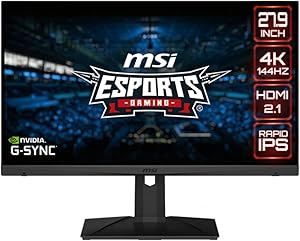
MSI Optix MAG281URF 28" 4K 144Hz Gaming Monitor
4KHDR400
Experience Gaming in Stunning DetailDominate the competition with the MSI MAG281URF Gaming Monitor. Featuring a 4K UHD display, rapid IPS technology, and a high refresh rate, this monitor delivers unparalleled visual clarity and smooth gameplay for an immersive gaming experience. Specifications: ...
$201.60*
Check availability
*Price sourced from Amazon.com. Last updated:Aug 31, 2026.Price and availability are subject to change — details.
Affiliate Disclosure: As an Amazon Associate, Studio Supplies earns from qualifying purchases made through links on this page, at no additional cost to you. This helps support our editorial team.
Notice a mistake? Let Us Know
Overview
Experience Gaming in Stunning Detail
Dominate the competition with the MSI MAG281URF Gaming Monitor. Featuring a 4K UHD display, rapid IPS technology, and a high refresh rate, this monitor delivers unparalleled visual clarity and smooth gameplay for an immersive gaming experience.
Specifications:
- Brand: MSI
- Model: Optix MAG281URF
- Screen Size: 28"
- Resolution: 3840 x 2160 (UHD)
- Panel Type: Rapid IPS
- Response Time: 1ms GTG
- Refresh Rate: 144Hz
- Sync Technology: G-Sync Compatible
- HDR: HDR 400
Key Features
4K High Resolution at 144Hz high refresh rate.Specific uses for product - Gaming
Viewing Angle is 178° (H) / 178° (V); Brightness(typ) is 300nits; Aspect Ratio is 16:9
Rapid IPS – Provides 1ms GTG fast response time, optimizes screen colors and brightness
HDR400 provide a display with the most realistic colors.
Gaming OSD App – Create the ultimate viewing settings for your game
Specifications
Screen Size
28"
Resolution
4K (3840 x 2160)
Refresh Rate
144Hz
Panel Type
Rapid IPS
Response Time
1ms GTG
HDR Support
HDR400
Viewing Angle
178° (H) / 178° (V)
Brightness (typ)
300nits
Aspect Ratio
16:9
Specific Uses
Gaming
Frequently Asked Questions
What is the resolution and refresh rate of the MSI Optix MAG281URF monitor?
The MSI Optix MAG281URF monitor features a 4K high resolution and a 144Hz high refresh rate.
What type of panel does this monitor use for its display?
This monitor utilizes a Rapid IPS panel, which provides a 1ms GTG fast response time.
Does the MSI Optix MAG281URF support HDR?
Yes, it supports HDR400, which aims to provide realistic colors on the display.
What is the typical brightness level of this monitor?
The typical brightness level of this monitor is 300 nits.
What are the viewing angles for this monitor?
The viewing angles are 178° horizontally and 178° vertically, ensuring consistent image quality.
Can users customize their viewing settings for different games?
Yes, the Gaming OSD App allows users to create ultimate viewing settings for their games.
Related Products


