Neewer

Neewer 10102942 RT113 Teleprompter Remote Control

4.6 (25 reviews)

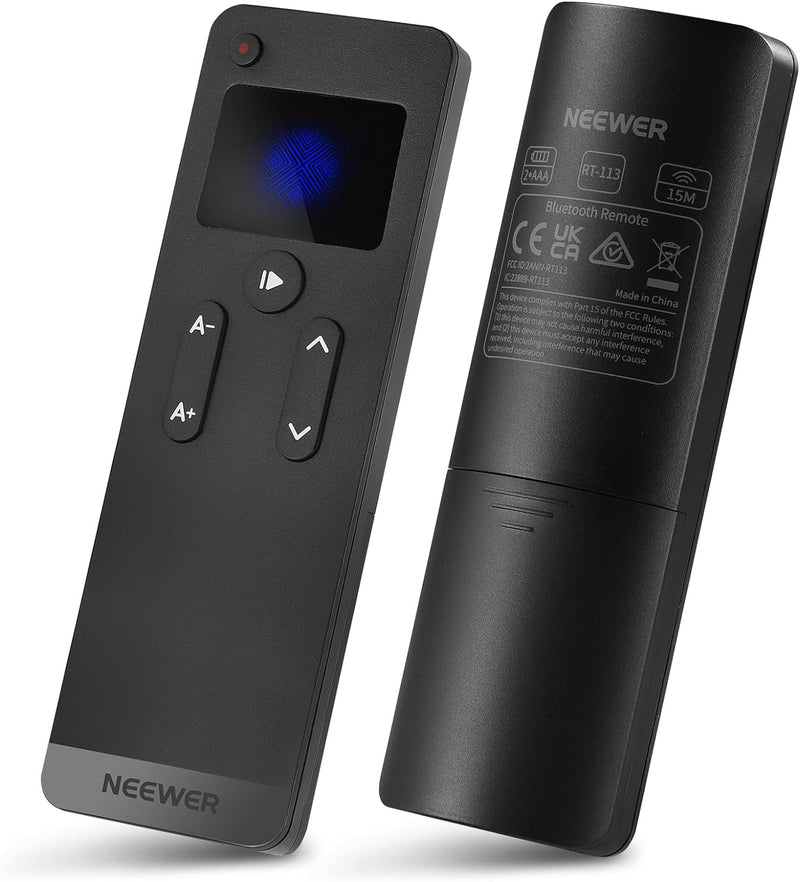
The Neewer RT113 Bluetooth remote gives you silent, wireless control of the Neewer Teleprompter App.

View price on Amazon
Affiliate Disclosure: Studio Supplies may earn a commission from qualifying purchases made through links on this page, at no additional cost to you. This helps support our editorial team.

Notice a mistake? Let Us Know

Overview

The Neewer RT113 (model 10102942) is a compact Bluetooth remote control engineered to work with the Neewer Teleprompter App on iOS and Android devices. It connects to your smartphone or tablet through your device's Bluetooth settings, giving you wireless control over your scrolling script without needing to touch the screen. From the remote, you can play or pause the script, adjust scrolling speed on the fly, change the font size for readability, and navigate pages up or down — all critical functions when you are in front of the camera and need to stay focused on your delivery.

A key design consideration of the RT113 is its silent, tactile button operation. Unlike standard Bluetooth remotes that can produce audible clicks picked up by microphones, the RT113's buttons are engineered to be quiet enough for use during active recording sessions. The remote is compatible with a broad range of Neewer teleprompter hardware including the X1 Pro, X10, X12, X14, X16, X17, and X17 II models, and it also works with teleprompters from other brands when paired with the Neewer app. Powered by two AAA batteries with a manual power-off switch for battery conservation, the RT113 is a lightweight, affordable tool that adds meaningful hands-free convenience to any teleprompter-based workflow.

Key Features

【Work with NEEWER Teleprompter App】 The NEEWER RT113 remote control can work with NEEWER Teleprompter App to help you record videos, tutorials, and presentations. It easily connects to your mobile device via Bluetooth, compatible with iPhone, iPad, and Android smartphones and tablets. Note: NOT compatible with Windows

【Wide Compatibility】 It works perfectly with the NEEWER teleprompters (X1 Pro, X10, X12, X14, X16, X17, X17 II etc). Just pair it with your mobile device in the system’s Settings > Bluetooth panel, then you are good to go. Note: Before connection, please enable Bluetooth and Location Services on your device

【Effortless Operation】 Use the remote to play/pause the script, change font size, control scrolling speed, and turn the page up and down within the NEEWER Teleprompter App. The App is available from App Store and Google Play Store download free

【Noise Free Recording】 Silent and tactile control buttons make operation effortless and discreet, so your audience will not notice

【Power Source】 Powered by 2 x AAA batteries (sold separately). It can be turned off manually to save battery power. Compact and lightweight, you can use it anywhere

Specifications

Brand
Neewer
Model
10102942
Connectivity
Bluetooth
Compatible App
Neewer Teleprompter App (iOS and Android)
Compatible Teleprompters
X1 Pro, X10, X12, X14, X16, X17, X17 II, and others
Controls
Play/Pause, Font Size, Scrolling Speed, Page Up/Down
Power Source
2 x AAA Batteries (not included)
Windows Compatible
No

Pros & Cons

👍 Pros

  • Silent, tactile buttons allow discreet script control without audible clicks during recording
  • Bluetooth connectivity eliminates the need for cables or line-of-sight to your device
  • Controls scrolling speed, font size, play/pause, and page navigation all from one compact remote
  • Compatible with a wide range of Neewer teleprompter models including the X1 Pro through X17 II
  • Lightweight and compact design is easy to hold or conceal during presentations

👎 Cons

  • Only works with the Neewer Teleprompter App, not with third-party teleprompter software
  • Not compatible with Windows devices, limiting use to iOS and Android mobile platforms
  • Requires 2 AAA batteries that are not included in the box
  • Bluetooth pairing requires Location Services to be enabled on the mobile device

Frequently Asked Questions

The RT113 is designed to work specifically with the Neewer Teleprompter App, which is available as a free download from the Apple App Store and Google Play Store. It is not a general-purpose Bluetooth remote.
The remote lets you play and pause your script, adjust font size, control scrolling speed, and page up or down within the Neewer Teleprompter App — all without touching your phone or tablet.
No, the RT113 is not compatible with Windows. It connects via Bluetooth to iPhones, iPads, and Android smartphones and tablets only.
The RT113 is compatible with Neewer teleprompter models including the X1 Pro, X10, X12, X14, X16, X17, and X17 II, among others. It pairs with the mobile device running the app, not directly with the teleprompter hardware.
The remote runs on 2 AAA batteries, which are not included. It features a manual power-off switch to conserve battery life when not in use.