



NZXT
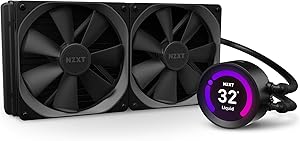
NZXT RL-KRZ63-01 Kraken Z63 280mm AIO Liquid CPU Cooler
The Kraken Z63 pairs a 280mm radiator's serious thermal headroom with a 2.36" LCD display that turns your pump head into a live system monitor.
$254.99*
Check availability
*Price sourced from Amazon.com. Last updated:Sep 12, 2026.Price and availability are subject to change — details.
Affiliate Disclosure: As an Amazon Associate, Studio Supplies earns from qualifying purchases made through links on this page, at no additional cost to you. This helps support our editorial team.
Notice a mistake? Let Us Know
Overview
Key Features
Customize Your Battlestation: With a bright, 2.36” LCD screen capable of displaying 24-bit color, you can now completely customize the look of your CPU cooler.CPU Compatibility : Intel LGA: 1200, 1151, 1150, 1155, 1156, 1366, 2011, 2011-3, 2066. Intel Series: i9, i7, i5, i3, Pentium, Celeron. AMD Socket: AM4, sTRX4, TR4. AMD Series: Ryzen 9, Ryzen 7, Ryzen 5, Ryzen 3,Threadripper; Threadripper bracket not included.Refer to the PDF attached below in Technical Specification for Installation
Stay In Control: CAM’s elegant, user-friendly software makes you the master of your PC with a simple-to-use, intuitive controls, you can manage your Kraken’s performance and appearance with ease
Incredible Performance: Featuring a chamfered intake and fluid dynamic bearings, they deliver silent operation, long-term reliability, and powerful cooling performance
Simple Installation: With the fully programmable display, the pump can be rotated to fit the needs of your motherboard without affecting the direction of the logo or image
Compatible Socket and CPU: Intel Socket LGA 1151, 1150, 1155, 1156, 1366, 2011, 2011-3, 2066, AMD Socket AM4, TR4(bracket not included)
Specifications
Radiator Size
280mm
Screen Type
2.36” LCD screen
Screen Color Depth
24-bit
Intel CPU Compatibility
LGA 1200, 1151, 1150, 1155, 1156, 1366, 2011, 2011-3, 2066
Intel CPU Series Supported
i9, i7, i5, i3, Pentium, Celeron
AMD Socket Compatibility
AM4, sTRX4, TR4
AMD CPU Series Supported
Ryzen 9, Ryzen 7, Ryzen 5, Ryzen 3, Threadripper
Bearing Type
Fluid Dynamic Bearings
Frequently Asked Questions
What socket platforms does the Kraken Z63 support natively, and what requires an extra bracket?
Out of the box it supports Intel LGA 1150/1151/1155/1156/1200/1366/2011/2011-3/2066 and AMD AM4. TR4/sTRX4 (Threadripper) is compatible but requires a separately purchased bracket — it is not included in the box.
Can the pump head be rotated after mounting so the LCD is oriented correctly?
Yes. The pump head decouples from the cold plate assembly and rotates 360°, so you can orient the display portrait or landscape regardless of which direction the tubes exit. The LCD image or animation rotates independently through CAM software, so the displayed content always appears right-side-up.
What can the 2.36" LCD actually show — is it limited to preset animations?
No. Through NZXT's CAM software you can display CPU temperature, GPU temperature, clock speed, fan RPM, custom static images (JPEG/PNG), or animated GIFs. It renders in 24-bit color at 240×240 resolution, so custom artwork and real-time sensor readouts both look sharp.
How does the Z63 compare thermally to a 240mm AIO, and is it enough for a 125W+ TDP processor?
The 280mm radiator provides roughly 15–20% more surface area than a 240mm unit. In practice that translates to 3–8°C lower peak temperatures under sustained load, depending on case airflow. It handles 125W–165W TDP processors (i9-10900K, Ryzen 9 5900X class) comfortably with headroom for moderate overclocks.
Does the Kraken Z63 require CAM software to function, or is it plug-and-play?
The pump and fans operate at default profiles without CAM installed — the cooler will run and cool without any software. However, the LCD display defaults to a static NZXT logo, and fan/pump curves cannot be customized without CAM. Full feature use requires the CAM application on Windows.
Related Products


