

Panasonic
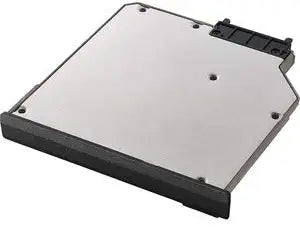
Panasonic FZ-VSD551T1W Toughbook 55 1TB SSD 2nd Drive
1TB SSD
Expand Your Toughbook 55 Storage CapacityThe Panasonic FZ-VSD551T1W is a 1TB SSD 2nd Drive xPAK designed for the Toughbook 55 Mk1. This quick-release expansion provides additional storage in the FZ-55's universal bay, ensuring you have ample space for all your critical data. Compatibility: ...
$775.99*
Check availability
*Price sourced from Amazon.com. Last updated:Aug 28, 2026.Price and availability are subject to change — details.
Affiliate Disclosure: As an Amazon Associate, Studio Supplies earns from qualifying purchases made through links on this page, at no additional cost to you. This helps support our editorial team.
Notice a mistake? Let Us Know
Overview
Expand Your Toughbook 55 Storage Capacity
The Panasonic FZ-VSD551T1W is a 1TB SSD 2nd Drive xPAK designed for the Toughbook 55 Mk1. This quick-release expansion provides additional storage in the FZ-55's universal bay, ensuring you have ample space for all your critical data.
- Compatibility: Panasonic Toughbook 55 FZ-55 Mk1
- Storage Capacity: 1TB
- Drive Type: SSD (Solid State Drive)
- Installation: Quick-Release xPAK
- Location: Universal Bay Expansion Area
Key Features
FZ-55 EXPANSION MODULE - GOES IN BAY
1TB SSD 2nd Drive xPAK (TOUGHBOOK 55 Universal Bay Expansion AreA
Specifications
Capacity
1TB
Type
SSD (Solid State Drive)
Compatibility
Panasonic Toughbook 55
Form Factor
xPAK Expansion Module
Location
Universal Bay Expansion Area
Frequently Asked Questions
Which laptop models is the FZ-VSD551T1W 1TB SSD compatible with?
This 1TB SSD is designed as an xPAK expansion module specifically for the Panasonic Toughbook 55, integrating into its universal bay.
What is the storage capacity of this drive?
The Panasonic FZ-VSD551T1W provides 1TB of storage, which is useful for expanding the data capacity of a compatible Toughbook 55.
Is this an HDD or an SSD?
This is a Solid State Drive (SSD), known for its faster data access speeds and enhanced durability compared to traditional Hard Disk Drives.
Where does this drive install in the Toughbook 55?
The FZ-VSD551T1W is an expansion module that installs into the universal bay expansion area of the Toughbook 55.
Can this 1TB SSD be used as the primary boot drive?
While it functions as a second drive, its capability as a primary boot drive would depend on the Toughbook 55's BIOS settings and specific configuration by the user.
Related Products

