

Phase One
Phase One Capture One Pro 8 Download
HDR
Unleash Your Creative Potential with Advanced Image EditingIntroducing Capture One Pro 8, the professional photo editing software designed to refine and manage your images with unparalleled precision. This download version enhances your workflow with tools that bring out the finest details and cr...
Check availability
Affiliate Disclosure: As an Amazon Associate, Studio Supplies earns from qualifying purchases made through links on this page, at no additional cost to you. This helps support our editorial team.
Notice a mistake? Let Us Know
Overview
Unleash Your Creative Potential with Advanced Image Editing
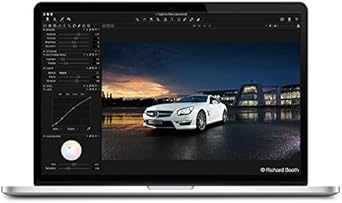
Introducing Capture One Pro 8, the professional photo editing software designed to refine and manage your images with unparalleled precision. This download version enhances your workflow with tools that bring out the finest details and creative effects.
- Film Grain: Mimic film stock with adjustable grain.
- Repair Layers: Remove unwanted objects and blemishes.
- HDR Tool: Enhance highlights and shadows in images.
Key Features
Film Grain: Add film like grain to your images to mimic film stock, hide noise or simply for creative effect.
Repair Layers: Take full control of the content of your images and remove unwanted objects or blemishes.
Improved Speed and Stability: With many stability and performance improvements, Capture One Pro 8 gives you a market-leading, high-quality workflow for refining and managing your images.
Improved HDR tool: Bring out even more detail in highlights and shadows – even in over- or underexposed images.
Specifications
Software Type
Image Editing and Management
Version
Pro 8
Feature 1
Film Grain
Feature 2
Repair Layers
Feature 3
Improved HDR Tool
Frequently Asked Questions
What is the Film Grain feature in Capture One Pro 8 designed for?
The Film Grain feature in Capture One Pro 8 allows users to add film-like grain to their images, which can be used to mimic different film stocks, subtly hide noise, or for creative artistic effects.
How do the Repair Layers function within Capture One Pro 8?
Repair Layers in Capture One Pro 8 provide extensive control over image content, enabling users to effectively remove unwanted objects or blemishes from their photographs.
What improvements can be expected in terms of performance with Capture One Pro 8?
Capture One Pro 8 offers improved speed and stability, translating into a market-leading, high-quality workflow for refining and managing images efficiently.
Can Capture One Pro 8 help with images that are over or underexposed?
Yes, Capture One Pro 8 includes an improved HDR tool designed to bring out even more detail in highlights and shadows, proving useful for images that are over- or underexposed.
Is Capture One Pro 8 a physical product or a digital download?
Phase One Capture One Pro 8 is offered as a digital download, meaning you will receive a license key and instructions to download the software.
Related Products


