



QNAP
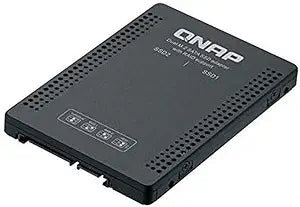
QNAP QDA-A2MAR SATA to Dual M.2 Adapter
Fit two M.2 SATA SSDs into a single 2.5-inch bay with hardware RAID support for flexible storage expansion.
$91.78*
Check availability
*Price sourced from Amazon.com. Last updated:Aug 29, 2026.Price and availability are subject to change — details.
Affiliate Disclosure: As an Amazon Associate, Studio Supplies earns from qualifying purchases made through links on this page, at no additional cost to you. This helps support our editorial team.
Notice a mistake? Let Us Know
Overview
Key Features
Item Package Quantity: 1
Model Number: QDA-A2MAR
Country of origin:- Taiwan
Item Package Weight: 229 grams
Specifications
Brand
QNAP
Model
QDA-A2MAR
Form Factor
2.5-inch
Host Interface
SATA
M.2 Support
Dual M.2 2280 SATA
RAID Modes
Hardware RAID 0, RAID 1, JBOD, Individual Disk
Country of Origin
Taiwan
Package Weight
229 grams
Frequently Asked Questions
Does the QDA-A2MAR support M.2 NVMe drives?
No, this adapter supports only M.2 2280 SATA SSDs. NVMe drives are not compatible.
What RAID modes are available on this adapter?
The QDA-A2MAR supports hardware RAID 0 (striping for performance), RAID 1 (mirroring for redundancy), JBOD, and Individual Disk mode.
Can I use this adapter in a standard desktop or laptop that has a 2.5-inch SATA bay?
Yes, it fits any standard 2.5-inch SATA drive bay, whether in a desktop, laptop, or NAS enclosure.
Is any software or driver required to configure the RAID settings?
No, RAID configuration is handled via a hardware DIP switch on the adapter itself, so no software or drivers are needed.
Related Products

