



QNAP
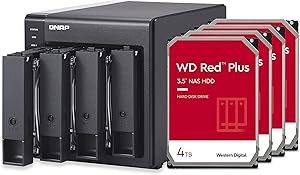
QNAP TR-004-44W-US 4-Bay DAS 12TB WD Red Plus HDD Bundle
44WUSB 3.2
Hardware RAID 5 across four 4TB WD Red Plus drives delivers 9TB of fault-tolerant, USB-accessible storage in a single DAS enclosure.
$499.00*
Check availability
*Price sourced from Amazon.com. Last updated:Aug 28, 2026.Price and availability are subject to change — details.
Affiliate Disclosure: As an Amazon Associate, Studio Supplies earns from qualifying purchases made through links on this page, at no additional cost to you. This helps support our editorial team.
Notice a mistake? Let Us Know
Overview
Key Features
4 x 4TB WD Red Plus drives pre-installed and pre-configured with RAID 5
USB Type-C Direct Attached Storage (DAS) for Windows, macOS and Linux
Use the TR-004 as external storage for NAS backup
Expand the capacity of your QNAP NAS
Supports 4 x 3.5/2.5-inch SATA 3Gb/s
USB 3.2 Gen 1 Port; Lockable drive Bays
Includes a USB Type-C to Type-A connector cable
Hardware RAID supports RAID 0, 1, 5, JBOD, and individual
Specifications
Model
TR-004-44W-US
Drive Bays
4 x 3.5"/2.5" SATA 3Gb/s
Included Drives
4 x 4TB WD Red Plus HDD
Total Raw Capacity
16TB
Usable Capacity (RAID 5)
~9TB
Interface
USB 3.2 Gen 1 (USB Type-C)
Interface Speed
5Gbps
RAID Modes Supported
RAID 0, 1, 5, JBOD, Individual
Pre-configured RAID
RAID 5
Drive Bay Lock
Yes, lockable bays
Included Cable
USB Type-C to Type-A
OS Compatibility
Windows, macOS, Linux
Frequently Asked Questions
What usable capacity do I actually get with the pre-configured RAID 5 array?
Approximately 9TB usable. RAID 5 across four 4TB drives (16TB raw) sacrifices one drive's worth of capacity — 4TB — for parity. You gain single-drive fault tolerance, meaning you can lose any one of the four drives without data loss, then replace it and rebuild the array.
What interface speed does the USB 3.2 Gen 1 connection support, and is that a real-world bottleneck for HDD arrays?
USB 3.2 Gen 1 is rated at 5Gbps (625 MB/s theoretical). In practice, the four WD Red Plus HDDs in RAID 5 will peak around 400–500 MB/s combined sequential read, which sits comfortably within that USB ceiling. The mechanical drives are the throughput constraint here, not the USB interface.
Can I change the RAID configuration after purchase, and do I need QNAP software to do it?
Yes, the RAID mode is set via a hardware DIP switch on the enclosure — no software required. You can switch between RAID 0, 1, 5, JBOD, and individual disk modes. Note that changing the RAID mode will destroy existing data on the array; reconfiguration requires reinitializing the drives.
Will this work as a standalone DAS connected directly to a Windows or Mac computer without any QNAP software installed?
Yes. The TR-004 presents as a standard USB storage device to any OS — Windows, macOS, and Linux — with no driver or QNAP software required. QNAP software is only necessary if you're using the TR-004 as a capacity expansion for a QNAP NAS over USB.
Are the drive bays lockable, and can I hot-swap drives during a RAID rebuild?
The drive bays include physical locks for transport security. Hot-swap support depends on the RAID mode in use — the hardware RAID controller in the TR-004 does support drive replacement for RAID rebuild, but verify your specific RAID mode's hot-swap behavior in QNAP's documentation before pulling a drive under load.
Related Products
