

QNAP
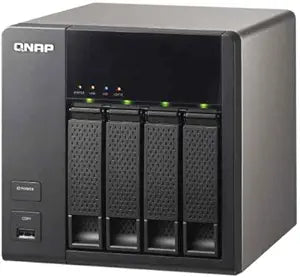
QNAP TS-469L Turbo NAS - No HDD
Unleash the Power of Networked StorageIntroducing the QNAP TS-469L Turbo NAS, a user-friendly, high-performance storage solution. Its sleek and quiet design houses up to 4 hard drives, configurable in RAID 0, 1, 5, 6, 10, or JBOD setups, coupled with data security measures.
View price on Amazon
Affiliate Disclosure: As an Amazon Associate, Studio Supplies earns from qualifying purchases made through links on this page, at no additional cost to you. This helps support our editorial team.
Notice a mistake? Let Us Know
Overview
Unleash the Power of Networked Storage
Introducing the QNAP TS-469L Turbo NAS, a user-friendly, high-performance storage solution. Its sleek and quiet design houses up to 4 hard drives, configurable in RAID 0, 1, 5, 6, 10, or JBOD setups, coupled with data security measures.
Specifications
Brand
QNAP
Model Name
TS-469L Turbo NAS
Drive Bays
4
Hard Drives Included
No
Function
Network Attached Storage
Frequently Asked Questions
Does the QNAP TS-469L Turbo NAS come with hard drives included?
No, the QNAP TS-469L Turbo NAS does not include hard drives; you will need to purchase and install them separately.
How many hard drives can this NAS accommodate?
The TS-469L Turbo NAS is designed to support up to four hard drives.
What is the primary function of the QNAP TS-469L?
The primary function of this device is to provide Network Attached Storage (NAS) for centralized data storage, sharing, and backup on a network.
Is this NAS suitable for home or business use?
QNAP Turbo NAS devices are versatile and can be used for both home users needing robust media storage and backup, or small to medium businesses requiring reliable network storage.
What kind of processor does the TS-469L use?
Specific details about the processor type, core count, or clock speed are not provided in the available product information for the QNAP TS-469L.
What kind of connectivity options does this NAS have?
The available information does not specify the exact number or type of connectivity ports, such as Ethernet or USB ports.
Related Products
