

Razer
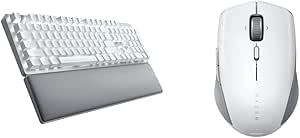
Razer Pro Type Ultra Wireless Keyboard & Pro Click Mini Mouse Bundle
Enhance Your Productivity with the Razer Pro Type Ultra Wireless Keyboard and Mouse Bundle Optimize your workspace with the Razer Pro Type Ultra Wireless Mechanical Keyboard and Pro Click Mini Portable Wireless Mouse Bundle. Experience silent mechanical switches, ergonomic design, and advanced wi...
$237.71*
Check availability
*Price sourced from Amazon.com. Last updated:Aug 28, 2026.Price and availability are subject to change — details.
Affiliate Disclosure: As an Amazon Associate, Studio Supplies earns from qualifying purchases made through links on this page, at no additional cost to you. This helps support our editorial team.
Notice a mistake? Let Us Know
Overview
Enhance Your Productivity with the Razer Pro Type Ultra Wireless Keyboard and Mouse Bundle
Optimize your workspace with the Razer Pro Type Ultra Wireless Mechanical Keyboard and Pro Click Mini Portable Wireless Mouse Bundle. Experience silent mechanical switches, ergonomic design, and advanced wireless connectivity for maximum productivity with minimal noise.
Specifications:
- Brand: Razer
- Keyboard: Razer Pro Type Ultra Wireless Mechanical Keyboard
- Mouse: Razer Pro Click Mini Portable Wireless Mouse
- Keyboard Features: Silent Linear Switches, Sound Dampening Foam, Fully Programmable Keys, Smart Controls, Ergonomic Design with Fingerprint-Resistant Soft-Touch Coating
- Mouse Features: Portable, Wireless
- Connectivity: Razer Productivity Dongle (connects keyboard and mouse)
Key Features
Maximum Productivity. Minimum Sound: The silent mechanical switches and sound dampening foam on this keyboard offer a quiet, distraction-free experience when at the office or WFH, while its super durable design lasts for up to 80 million clicks
Comfort with Every Keystroke: This ergonomically designed keyboard is high on comfort and features keycaps lined with a fingerprint-resistant, soft-touch coating—for a luxurious, cushioned feel that makes typing a joy
Superior Ergonomic Support: The soft, cushioned wrist support perfectly aligns to the keyboard to relieve wrist pressure, providing superior comfort and less strain over long periods of typing
Maximum Productivity. Minimum Sound: The silent mechanical switches on this mouse offer a quiet, distraction-free experience when at the office or WFH, while its super durable design lasts for up to 15 million clicks
Experience Ultimate Portability: The mouse’s sleek, subtle form factor fits easily into backpacks and briefcases, allowing maximum productivity and efficiency whether at the office or working from home
Navigation Made Effortless: Navigate easily with a scroll wheel that can switch between free-spin mode when viewing long webpages or documents, tactile mode for precise scrolling, and tilt-click for horizontal scrolling
Specifications
Keyboard Type
Wireless Mechanical
Keyboard Switches
Silent Mechanical
Keyboard Durability
Up to 80 million clicks
Keyboard Features
Sound dampening foam, fingerprint-resistant soft-touch keycaps, cushioned wrist support
Mouse Type
Wireless
Mouse Switches
Silent Mechanical
Mouse Durability
Up to 15 million clicks
Mouse Scroll Wheel
Free-spin mode, tactile mode, tilt-click
Connectivity
Wireless
Frequently Asked Questions
What makes the Razer Pro Type Ultra keyboard quiet?
The Razer Pro Type Ultra keyboard utilizes silent mechanical switches and integrated sound dampening foam to provide a quiet and distraction-free typing experience.
Is the keyboard comfortable for long periods of typing?
Yes, it is designed for comfort with keycaps featuring a fingerprint-resistant, soft-touch coating and includes a soft, cushioned wrist support to relieve pressure.
What are the key features of the included Razer Pro Click Mini Mouse?
The Pro Click Mini Mouse also features silent mechanical switches, a durable design lasting up to 15 million clicks, ultimate portability, and a versatile scroll wheel with free-spin, tactile, and tilt-click modes.
How durable is the Razer Pro Type Ultra keyboard?
The keyboard is built to be highly durable, with its design lasting for up to 80 million clicks, ensuring longevity even with extensive use.
Can the mouse be easily carried for work on the go?
Absolutely, the Pro Click Mini Mouse boasts a sleek, subtle form factor that fits easily into backpacks and briefcases, making it highly portable for any work setting.
What are the different scrolling options available on the Pro Click Mini Mouse?
The mouse's scroll wheel offers versatile navigation, allowing users to switch between free-spin mode for long documents, tactile mode for precise scrolling, and tilt-click for horizontal movement.
Related Products


