


Razer
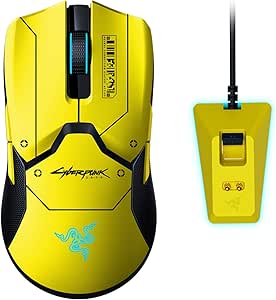
Razer RZ01-03050500-R3M1 Viper Ultimate Cyberpunk 2077 Wireless Mouse
The Cyberpunk 2077 Edition Viper Ultimate pairs a Focus+ 20K sensor and HyperSpeed wireless into a 78g esports mouse built for zero-compromise performance.
Check availability
Affiliate Disclosure: As an Amazon Associate, Studio Supplies earns from qualifying purchases made through links on this page, at no additional cost to you. This helps support our editorial team.
Notice a mistake? Let Us Know
Overview
Key Features
Gaming Peripherals Manufacturer in the US: Source - The NPD Group, Inc. U.S. Retail Tracking Service, Keyboards, Mice, PC Headset/Pc Microphone, Gaming Designed, based on dollar sales, 2017-2021
Ultra-Fast Razer HyperSpeed Wireless Technology: Faster than wired gaming mice
Focusplus 20K Optical Sensor: Cutting-edge precision
78g Lightweight - Designed for Esports: For swifter, controlled swipes
Optical Mouse Switch: Actuation at the speed of light
Specifications
Connectivity Technology
HyperSpeed Wireless
Sensor Type
Focusplus Optical
Sensor Resolution
20K DPI
Weight
78g
Switch Type
Optical Mouse Switch
Frequently Asked Questions
How does Razer HyperSpeed wireless compare to a wired connection in terms of latency?
Razer claims HyperSpeed operates faster than a standard wired gaming mouse by using a dedicated 2.4GHz channel with optimized polling. In practice, latency measurements between HyperSpeed and a high-quality wired mouse are imperceptible in gameplay. The meaningful difference is the elimination of cable drag — which for low-grip-force and fingertip players has a tangible effect on tracking consistency.
What is the actual DPI range of the Focus+ 20K sensor, and what should I use in practice?
The Focus+ sensor supports DPI from 100 to 20,000 in 50 DPI increments. In competitive esports use, most players configure 400–1600 DPI and adjust in-game sensitivity to achieve their preferred effective dots-per-inch. The high ceiling exists for users needing precision cursor control on high-resolution displays or large multi-monitor setups, not for raw speed in gaming.
How do the optical mouse switches differ from mechanical switches in this mouse?
Optical switches use an infrared light beam to register actuation rather than a physical contact mechanism. This eliminates debounce delay — the brief software delay mechanical switches require to prevent false double-clicks — and removes the physical wear point that causes mechanical switch failure over time. Actuation on the Viper Ultimate's optical switches is rated at 0.2ms versus the 1–5ms debounce delay on traditional mechanical switches.
What is the battery life, and how does the included charging dock work?
Battery life is rated up to 70 hours on a single charge with RGB disabled. The included charging dock uses contacts on the underside of the mouse — simply place the mouse on the dock between sessions. There is no need to plug in a cable to charge.
At 78g, how does the Viper Ultimate's weight compare to similarly spec'd wireless competitors?
78g places the Viper Ultimate in the lightweight esports tier. It is heavier than ultra-light designs with honeycomb shells (which reach 55–65g) but lighter than most full-featured wireless mice that include internal batteries and RGB hardware, which typically land at 90–110g. The 78g target reflects a balance between structural rigidity and low-inertia movement.
Related Products
