



Razer
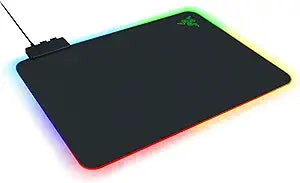
Razer RZ02-03020100-R3U1 Firefly V2 RGB Gaming Mouse Pad - Hard Surface
The Razer Firefly V2 pairs a hard-surface balanced tracking layer with 19-zone Chroma RGB in an ultra-thin profile built for competitive desks.
View on Amazon for pricing
Affiliate Disclosure: As an Amazon Associate, Studio Supplies earns from qualifying purchases made through links on this page, at no additional cost to you. This helps support our editorial team.
Notice a mistake? Let Us Know
Overview
Specifications
Surface Type
Hard
Lighting
RGB
Frequently Asked Questions
What is the surface type on the Firefly V2, and how does it affect cursor tracking?
The Firefly V2 uses a hard polymer surface described as "balanced" — meaning it sits between pure speed (low friction, fast glide) and pure control (high friction, precise stopping). It is optimized for optical and laser sensors running at mid-to-high DPI where both acceleration accuracy and smooth glide matter.
How does the cable management system on the Firefly V2 work?
A built-in cable management channel runs along the rear edge of the pad, designed to route your mouse cable and keep it off the surface. This reduces cable drag during lateral swipes, which can affect tracking consistency at the edges of the pad.
Does the Firefly V2 require software to function?
The Firefly V2 functions as a tracking surface without software, but the 19-zone Chroma RGB lighting requires Razer Synapse 3 (Windows/macOS) to customize colors, effects, and synchronization. Without Synapse installed, the pad defaults to a static lighting cycle.
Is the non-slip base effective on glass or polished desks?
The rubber base performs well on standard desk surfaces — wood laminate, MDF, and standard desk pads. On high-gloss or glass surfaces, grip can degrade noticeably. Razer does not rate this pad for glass desk use.
What are the dimensions of the Firefly V2, and will it fit a standard gaming desk?
Razer lists the Firefly V2 at approximately 355 x 255 x 3.5mm — roughly a medium-size footprint. It accommodates low-to-medium sensitivity setups with standard mouse movement arcs, but wide-arc low-DPI players may find the pad limiting compared to extended-size alternatives.
Related Products


