



Razer
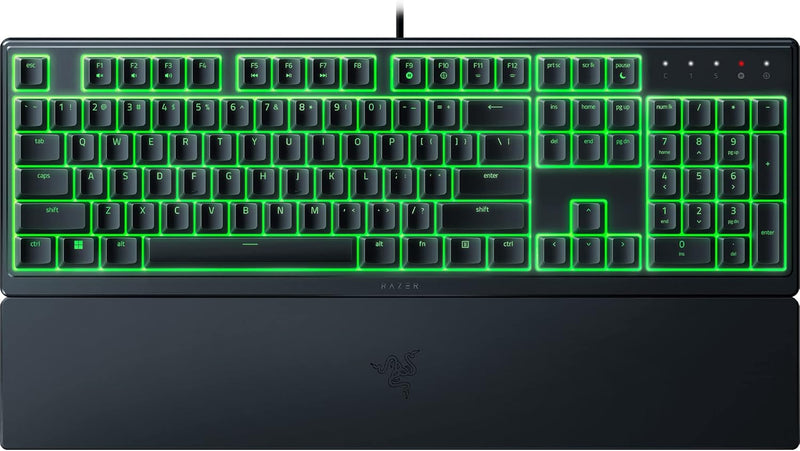
Razer RZ03-04470200 Ornata V3 X Low Profile Keyboard
The Ornata V3 X brings silent low-profile keys and Chroma RGB to your desktop without the clatter — Razer's quietest mainstream gaming keyboard built for long sessions.
$34.99*
View on Amazon
✓ In Stock on Amazon.com
*Price sourced from Amazon.com. Last updated:Aug 31, 2026.Price and availability are subject to change — details.
Affiliate Disclosure: As an Amazon Associate, Studio Supplies earns from qualifying purchases made through links on this page, at no additional cost to you. This helps support our editorial team.
Notice a mistake? Let Us Know
Overview
Key Features
Low-Profile Keys: With slimmer keycaps and shorter switches, enjoy natural hand positioning that allows for long hours of use with little strain
Silent Membrane Switches: Perfect for those who prefer a quieter, more comfortable experience when gaming or typing
Ergonomic Wrist Rest: Aligns to the keyboard and provides the perfect place to rest your wrists for support that’s vital during long periods of use
Durable, Spill-resistant Design: Sturdy build is tanky enough for those intense gaming sessions and can shrug off the effects of minor spills
Cable Routing Options: Grooves to neatly tuck in the cable and feed it out in any direction, so you can keep your desktop clear of clutter and mess
Powered by Razer Chroma RGB: With 16.8 million colors and a suite of effects to choose from, personalize the keyboard and get access to dynamic lighting effects for over 150 Chroma-integrated games
Specifications
Brand
Razer
Model
RZ03-04470200-R3U1
Switch Type
Silent Membrane
Key Profile
Low-Profile
Lighting
Razer Chroma RGB, 16.8 million colors
Wrist Rest
Integrated ergonomic
Design
Spill-resistant
Connectivity
Wired USB
Color
Classic Black
Cable Routing
Three-direction cable routing grooves
Frequently Asked Questions
How does the V3 X's silent membrane feel compare to Razer's mechanical switches?
The V3 X uses silent low-profile membrane switches — shorter travel than standard membranes with a soft bottom-out and no tactile bump or audible click. The feel is closer to a laptop keyboard than a mechanical typewriter-style actuation. Users who prefer physical confirmation of key registration should look at Razer's mechanical lineup instead.
How does the low-profile design of the Ornata V3 X affect typing comfort compared to a standard-height keyboard?
The shorter keycaps and slimmer switch travel reduce wrist extension angle, which means your hands sit in a more natural position over hours of typing or gaming. Combined with the ergonomic wrist rest, it's a noticeable comfort upgrade over taller keyboards during long sessions — though typists who prefer deep key travel will find the shorter stroke less satisfying.
Are the switches mechanical or membrane, and what does that mean for gaming performance?
The Ornata V3 X uses silent membrane switches — not mechanical. Membrane actuation is softer and quieter than mechanical switches, with less tactile feedback. This is a deliberate design choice for quieter environments. Gamers who rely on tactile or clicky feedback will not get that here; the tradeoff is significantly reduced noise output.
Does the wrist rest detach for storage or compact desk setups?
Yes — the wrist rest is a separate unit that aligns to the keyboard base. It is not physically attached and can be removed when not needed.
Is the Chroma RGB on the V3 X per-key or zone-based?
Zone-based. Individual per-key color assignment is not supported on the Ornata V3 X. Users who require per-key RGB precision should consider Razer's mechanical keyboard models.
Does the Chroma RGB lighting on the Ornata V3 X require Razer Synapse software to function?
Basic static lighting works without software. Synapse is required for customizing effects, syncing with Chroma-integrated games, and saving lighting profiles. Synapse is Windows-only — macOS and Linux users cannot access advanced lighting customization.
How resistant is the Ornata V3 X to liquid spills?
The keyboard is rated as spill-resistant — minor liquid spills can be handled without immediate damage, particularly if dried quickly. It is not waterproof or rated for submersion; significant liquid exposure should be treated with immediate power disconnection and drying.
Does spill-resistant mean the keyboard can be rinsed or submerged?
No — spill resistance means the keyboard can survive minor liquid exposure without immediate failure. Submersion or rinsing will damage the electronics. If a spill occurs, disconnect the USB cable immediately and allow the keyboard to dry completely before reconnecting.
Does full Chroma RGB customization require Razer Synapse software?
Yes — Chroma lighting effects and macro assignment require Razer Synapse 3, which is Windows-compatible. The keyboard functions plug-and-play on a default lighting profile without Synapse, but full customization and game integration require the software installed.
Does the wrist rest attach to the keyboard or is it a separate accessory?
The ergonomic wrist rest is integrated — it aligns directly with the keyboard base and is included in the package. It is not a detachable snap-on accessory in the traditional sense; it ships as part of the keyboard assembly.
Related Products


