



Samsung
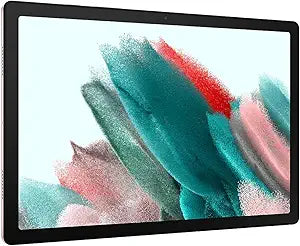
Samsung SM-X200NIDEXAR Galaxy Tab A8 64GB 10.5" Android Tablet
USB C
A 10.5-inch family-ready Android tablet with 64GB onboard storage and seamless Samsung ecosystem integration for shared household use.
View price on Amazon
Affiliate Disclosure: As an Amazon Associate, Studio Supplies earns from qualifying purchases made through links on this page, at no additional cost to you. This helps support our editorial team.
Notice a mistake? Let Us Know
Overview
Key Features
A Screen Everyone Will Love: Whether your family is streaming or video chatting with friends, the Galaxy Tab A8 tablet brings out the best in every moment on a 10.5" LCD screen
Power and Storage for All: Get the power, storage and speed your family needs with an upgraded chipset and plenty of room to keep files — up to 128GB of storage; A long-lasting battery lets you go unplugged for hours to keep the family fun going
Charge Fast, Power for Hours: Go for hours on a single charge and back to 100 percent with the fast charging USB C port; Battery life may vary depending on network environment, usage patterns and other factors
Galaxy Ecosystem Experience: Open up a new world of convenient possibilities with the Galaxy ecosystem experience — your devices, including your phone, laptop computer, and tablet, all automatically talk to one another seamlessly
Your Notes, All in One Place: Do more with your notes with Galaxy connectivity that automatically syncs everything from to-do lists to school work, whether you’re on your tablet, phone or watch
Kids Digital Learning: Children can enjoy access to Samsung Kids, a library of safe and fun games, books and videos that are kid friendly and parent approved
Easiest. Transfer. Ever: No matter what operating system you're using, Smart Switch makes it a breeze to move your data and favorite files in three easy steps
Specifications
Model
SM-X200NIDEXAR
Display
10.5" LCD, 1920×1200 (WUXGA+)
Chipset
Unisoc T618 Octa-Core (2× Cortex-A75 @ 2.0GHz + 6× Cortex-A55)
RAM
4GB
Storage
64GB (expandable via microSD)
Operating System
Android (One UI)
Battery
7,040mAh
Charging
15W Fast Charge, USB-C
Color
Pink Gold
Connectivity
Wi-Fi, Bluetooth, USB-C
Frequently Asked Questions
What processor does the Galaxy Tab A8 use, and how does it affect everyday performance?
Samsung upgraded the Tab A8 to an Unisoc T618 octa-core chipset (two Cortex-A75 performance cores at 2.0GHz, six Cortex-A55 efficiency cores), replacing the slower chipset in the prior generation. For streaming, web browsing, and light productivity, this is a meaningful step up — you'll notice snappier app launches and smoother multitasking compared to its predecessor, though it won't handle demanding 3D games at high settings.
Can the 64GB storage be expanded, and how much usable space does the buyer actually get?
Yes, the Tab A8 supports microSD expansion. Out of the box, the 64GB model typically yields around 52–55GB of usable storage after the OS and preloaded apps. For a family device with photos, videos, and children's educational apps, the microSD slot is a practical necessity rather than a bonus.
Does the Tab A8 support fast charging, and what charger is in the box?
The Tab A8 supports 15W fast charging via its USB-C port. Samsung does not include a charger adapter in the retail box — only the USB-C cable. You'll need a USB-C charger rated for 15W or higher to take advantage of the fast-charging spec; a standard 5W adapter will charge the device significantly slower.
Is this tablet compatible with Samsung DeX or S Pen input?
No. The Galaxy Tab A8 does not support DeX mode or S Pen input. It is a mid-range consumer tablet aimed at media consumption and family use. If stylus input or desktop-mode productivity is a requirement, you'd need to look at the Tab S series.
How does Samsung Kids work on this device, and is it truly safe for children?
Samsung Kids is a locked-down, curated environment built into One UI. Parents set a PIN to enter and exit, and children can only access pre-approved apps, games, and content within the walled space. Usage time limits can also be configured. It runs directly on the tablet — no secondary hardware required.
Related Products


