

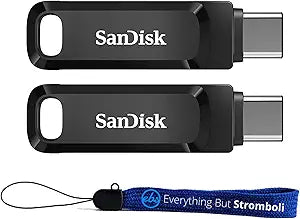


SanDisk
SanDisk SDDDC3-032G Ultra Dual 32GB USB Drive 2-Pack
Dual USB-A and USB-C connectors on a single drive eliminate adapter fumbling across every device in your workflow.
$21.02*
Check availability
*Price sourced from Amazon.com. Last updated:Oct 26, 2026.Price and availability are subject to change — details.
Affiliate Disclosure: As an Amazon Associate, Studio Supplies earns from qualifying purchases made through links on this page, at no additional cost to you. This helps support our editorial team.
Notice a mistake? Let Us Know
Overview
Key Features
Bundle includes (2) 32GB SanDisk Ultra Dual Drive Go Type-C & Type-A Flash Drives and (1) Everything But Stromboli Lanyard
Two connectors for standard USB (Type A) and USB-C (Type C) ports
Free up space on your Android or Apple iPhone equipped with Type-C ports and easily transfer files between smartphones, tablets, and PC or Mac computers equipped with USB TypeC port and OTG (on the go) support
Delivers USB 3.1 high speeds of up to 150MB/s
With the SanDisk Memory Zone app you can set to automatically back up your digital content such as pictures, video, music, documents, photos, and more so you don’t have to worry about losing it
Specifications
Capacity
32GB per drive
Bundle Contents
2x SanDisk Ultra Dual Drive Go + 1x lanyard
Connectors
USB Type-A, USB Type-C
USB Standard
USB 3.1
Read Speed
Up to 150MB/s
OTG Support
Yes
Compatible Devices
Android/iOS (USB-C), PC, Mac
App Compatibility
SanDisk Memory Zone (Android)
Frequently Asked Questions
Can I use the Type-A and Type-C connectors on the same drive simultaneously?
No. The dual-connector design provides one physical drive with two connection options — you use either the Type-A or Type-C connector at a time, not both simultaneously. The design eliminates the need for adapters, not the need to choose a port.
What USB standard does the Ultra Dual Drive Go use, and what does that mean for transfer speed?
These drives use USB 3.1, which delivers read speeds up to 150MB/s. In practical terms, transferring a 4GB video file takes roughly 27 seconds at peak speed — a meaningful improvement over USB 2.0 drives, which would take several minutes for the same file.
Do both the USB-A and USB-C connectors on this drive support USB 3.1 speeds?
The USB-A connector delivers the USB 3.1 high-speed performance rated at up to 150MB/s. The USB-C end connects to Type-C ports with OTG (On-The-Go) support — confirm your device supports USB-C OTG for full high-speed transfers from smartphones and tablets.
Does the 150MB/s USB 3.1 read speed require a USB 3.1 port on the host device to achieve?
Yes. The 150MB/s maximum read speed requires a USB 3.1 Gen 1 (5Gbps) or faster host port. USB 2.0 ports will limit transfer speed to approximately 40MB/s. USB 3.0 and USB 3.1 Gen 1 ports are physically and electrically equivalent and will achieve full speed.
What OTG support is required for the Type-C connector to work with Android phones?
The Type-C connector requires OTG (On-The-Go) support on the Android device to function as a host — allowing the phone to read the drive rather than acting as a peripheral. Most Android phones from 2016 onward support USB OTG; verify your specific device's OTG support before relying on this use case.
What is the SanDisk Memory Zone app, and do I need it to use the drive?
Memory Zone is a free Android app that can automatically back up photos, videos, music, and documents from your phone to the drive. It is optional — the drive functions as standard removable storage without the app installed — but the automated backup feature is useful for users who want hands-off content offloading.
Is this drive compatible with iPhones that have USB-C ports?
Yes. iPhones equipped with USB-C ports (iPhone 15 and later) support this drive via the Type-C connector, provided the device supports OTG storage access. Older Lightning-port iPhones are not compatible with either connector on this drive.
Does the SanDisk Memory Zone app work on both Android and iOS?
The SanDisk Memory Zone app is Android-only. iOS users can access the drive via the Files app when connected to a Type-C iPhone, but the automated backup and organization features of Memory Zone are not available on iOS.
Is the 32GB capacity per drive, or 32GB total across both drives in the pack?
Each drive in the 2-pack is 32GB — the bundle contains two individual 32GB SanDisk Ultra Dual Drive Go units plus one Everything But Stromboli lanyard. Total raw storage across both drives is 64GB.
What's in this 2-pack bundle beyond the two drives?
The bundle includes two 32GB SanDisk Ultra Dual Drive Go units and one Everything But Stromboli lanyard. No additional adapters, hubs, or software licenses are included beyond the free SanDisk Memory Zone app availability.
Related Products


