



Seagate
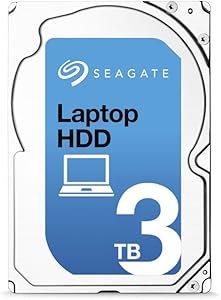
Seagate ST3000LM016 3TB Laptop Internal HDD
Three terabytes of 2.5-inch SATA storage at 128MB cache gives your laptop or all-in-one a high-capacity upgrade without the desktop form factor penalty.
View price on Amazon
Affiliate Disclosure: As an Amazon Associate, Studio Supplies earns from qualifying purchases made through links on this page, at no additional cost to you. This helps support our editorial team.
Notice a mistake? Let Us Know
Overview
Key Features
Each drive can store more than 1 million songs or 480 hours of HD video
Ideal for applications, such as: external storage, all-in-one PC storage and ultra-slim desktop storage
Smaller than your regular 3.5-inch desktop HDD, at 2.5 inches, yet delivers up to 4TB of storage capacity
Specifications
Brand
Seagate
Model
ST3000LM016
Storage Capacity
3TB
Form Factor
2.5 inches
Ideal Applications
External storage, all-in-one PC storage, ultra-slim desktop storage
Similar Products
Other products from the same family that visitors often consider:
 ✓ Available
Seagate Desktop HDD ST3000DM003 3TB Internal Drive
View on Amazon →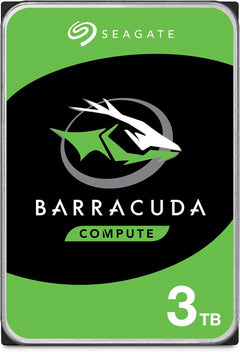 ✓ Available
Seagate ST3000DM008 BarraCuda 3TB HDD - Internal, 7200 RPM
View on Amazon → ✓ Available
Seagate ST3000DM001 Barracuda 3TB Internal HDD - 7200RPM (Renewed)
$94.99
View on Amazon → ✓ Available
Seagate ST33000650SS 3TB Constellation SAS 3.5" HDD
$175.00
View on Amazon → ✓ Available
Seagate ST3000DM001 3TB Desktop HDD (Renewed)
$110.00
View on Amazon →Frequently Asked Questions
What interface does the Seagate ST3000LM016 use, and is it compatible with my laptop?
The ST3000LM016 uses a SATA 6Gb/s interface — the same standard SATA connection used in virtually all laptops and all-in-ones with 2.5-inch drive bays. SATA 6Gb/s is backward compatible with SATA 3Gb/s ports, though at the slower SATA 3 bandwidth if your system's controller is older. Check that your laptop or chassis has a 2.5-inch SATA drive bay before purchasing — systems with M.2-only slots cannot use this drive.
What does the 15mm height mean for laptop compatibility?
Standard modern laptops use 7mm-height 2.5-inch drives; some older and larger form factor laptops accept 9.5mm or 15mm drives. The ST3000LM016 is 15mm thick, which is the tallest 2.5-inch form factor. This limits compatibility to laptops, all-in-ones, and external enclosures specifically designed to accommodate 15mm drives — most thin-and-light laptops from 2015 onward will not fit this drive. Confirm your chassis specifications before purchasing.
What are the real-world sequential read and write speeds for the ST3000LM016?
As a 5,400 RPM mechanical hard drive with a SATA 6Gb/s interface, the ST3000LM016 delivers sequential read speeds in the range of 100–140 MB/s and comparable sequential writes. The 128MB cache buffer helps with burst performance on small file operations. These speeds are substantially slower than any SATA or NVMe SSD — this drive is chosen for its 3TB capacity at competitive cost, not for speed. For an OS or application drive, an SSD is the appropriate choice; this drive excels as a high-capacity secondary storage volume.
Is the 3TB capacity formatted and ready to use out of the box?
The drive ships unformatted. You'll need to initialize and partition it using your operating system's disk management tool — Disk Management on Windows, Disk Utility on macOS. Note that drives above 2TB require GPT (GUID Partition Table) formatting rather than the legacy MBR format; MBR cannot address the full 3TB capacity. Most modern operating systems handle this automatically, but older BIOS-based (non-UEFI) systems may have 2.2TB addressing limitations to verify.
How does the 128MB cache affect everyday performance on this drive?
The 128MB DRAM cache is one of the larger cache sizes in the 2.5-inch HDD segment and it meaningfully improves burst read/write performance on sequential access patterns — particularly for large sequential file transfers. For fragmented random I/O (the kind that slows traditional HDDs most noticeably), the cache provides limited relief compared to an SSD. The 128MB cache is most beneficial during large media file transfers where sequential access is the dominant pattern.
Related Products
