



Sony
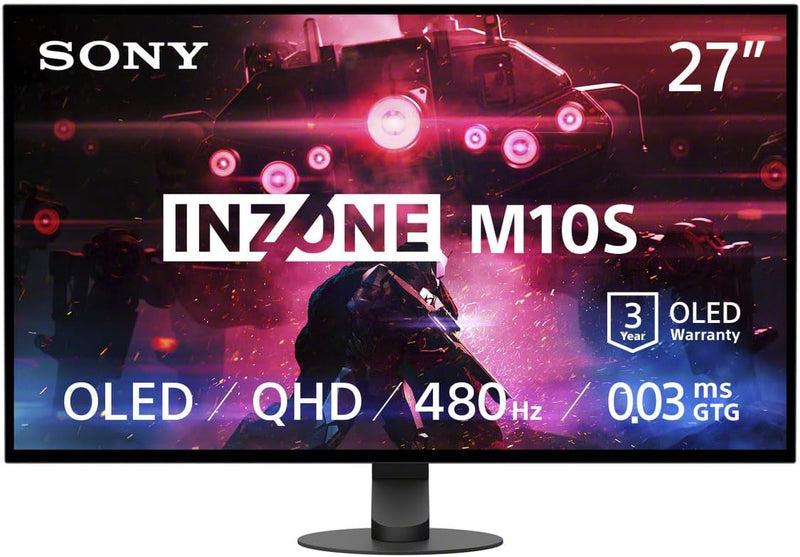
Sony SDM27Q10S 27" OLED 480Hz G-SYNC Gaming Monitor
★★★★★
QHDDisplayPortHDMI 2.1
Dominate the Game with Unrivaled Visuals Introducing the Sony INZONE M10S, a 27-inch OLED gaming monitor engineered for competitive excellence. Experience breathtaking clarity with its QHD (2560x1440) resolution and lightning-fast responsiveness thanks to the 480Hz refresh rate and up to 0.03ms r...
$798.00*$899.99Save 11%
View on Amazon
✓ In Stock on Amazon.com
*Price sourced from Amazon.com. Last updated:Jul 14, 2026.Price and availability are subject to change.
Affiliate Disclosure: Studio Supplies may earn a commission from qualifying purchases made through links on this page, at no additional cost to you. This helps support our editorial team.
Notice a mistake? Let Us Know
Overview
Dominate the Game with Unrivaled Visuals
Introducing the Sony INZONE M10S, a 27-inch OLED gaming monitor engineered for competitive excellence. Experience breathtaking clarity with its QHD (2560x1440) resolution and lightning-fast responsiveness thanks to the 480Hz refresh rate and up to 0.03ms response time. Co-developed with Fnatic esports team, the INZONE M10S empowers you with features designed to give you the competitive edge.
Specifications:
- Display: 27" OLED QHD (2560x1440)
- Refresh Rate: 480Hz
- Response Time: Up to 0.03ms (GtG)
- Compatibility: NVIDIA G-SYNC Compatible, VRR (HDMI 2.1), Adaptive Sync
- Features: Anti-Glare, FPS Pro/+ Modes, 24.5-inch Mode
- Inputs: 1x DisplayPort 2.1 (UHBR10), 2x HDMI 2.1, 1x USB-B upstream, 2x USB-A downstream, 3.5 mm Audio Out, USB-A (Software update)
- VESA Compatibility: 100mm x 100mm
- Stand Adjustments: Height, Tilt, ±180° Swivel
- Warranty: 3-Year OLED Limited Warranty (including burn-in coverage)
- Cooling: Fanless, Passive Cooling System with Custom Heatsink
- Dimensions: 21 x 38 x 49 inches
- Weight: 13.67 pounds
Key Features
LIGHTNING-FAST OLED DISPLAY: The INZONE M10S delivers ultra-low latency and 480Hz refresh rate, offering a 0.03ms response time (GtG) in QHD resolution for smooth, responsive FPS gaming.
LOW PROFILE STAND: The 4mm thin base maximizes desk space, offering more flexible keyboard and mouse setups. Includes height, tilt, and ±180° swivel adjustments, plus 100mmx100mm VESA compatibility.
TOURNAMENT READY: Developed with Fnatic e-sports team and packed with tournament ready features - Easily swap to a 24.5” mode alongside dedicated First Person Shooter (FPS Pro/plus) modes for enhanced contrasts during fast-paced games.
HIGH-PERFORMANCE COOLING STRUCTURE: OLED panel includes a fan-less, passive cooling system, with a custom heatsink to prevent burn in and ensure long-term use.
CUSTOM HEATSINK plus OLED CARE: Fan-less, high-performing cooling structure ensures long term of the panel. OLED care features include pixel/panel refresh, static image detection, pixel shift and screen saver.
3 YEAR OLED LIMITED WARRANTY: The INZONE M10S is backed by a 3-year Limited Warranty, including OLED burn-in coverage, so you can game worry free, match after match
HIGH-BANDWITH INPUTS: 1x DisplayPort 2.1 (UHBR10), 2x HDMI 2.1, 1x USB-B upstream, 2x USB-A downstream, 3.5 mm Audio Out, USB-A (Exclusive for software update)
NVIDIA G-SYNC COMPATIBLE: Supports NVIDIA G-SYNC to prevent tearing, even if the refresh rate fluctuates. VRR (HDMI 2.1) and adaptive sync compatible
Specifications
Screen Size
27"
Display Technology
OLED
Refresh Rate
480Hz
Response Time (GtG)
0.03ms (in QHD resolution)
Resolution
QHD
Stand Base Thickness
4mm
Stand Adjustments
Height, Tilt, ±180° Swivel
VESA Compatibility
100mmx100mm
Cooling System
Fan-less, Passive with Custom Heatsink
OLED Care Features
Pixel/Panel refresh, Static image detection, Pixel shift, Screen saver
DisplayPort Input
1x DisplayPort 2.1 (UHBR10)
HDMI Inputs
2x HDMI 2.1
USB Upstream
1x USB-B
USB Downstream
2x USB-A
Audio Output
3.5 mm Audio Out
Software Update Port
USB-A (Exclusive)
G-SYNC Compatibility
NVIDIA G-SYNC Compatible
Adaptive Sync
VRR (HDMI 2.1) and Adaptive Sync Compatible
Warranty
3-year Limited Warranty (includes OLED burn-in coverage)
Pros & Cons
👍 Pros
- Features an ultra-low 0.03ms response time (GtG) in QHD, ensuring incredibly smooth and responsive visuals for competitive gaming.
- Boasts a lightning-fast 480Hz refresh rate, providing exceptional fluidity and clarity during fast-paced action, crucial for esports.
- Includes a unique 4mm thin base stand that maximizes desk space, offering flexible keyboard and mouse positioning.
- Offers comprehensive ergonomic adjustments including height, tilt, and ±180° swivel, plus VESA compatibility for mounting flexibility.
- Comes with a 3-year limited warranty that includes OLED burn-in coverage, providing peace of mind for long-term usage.
👎 Cons
- While QHD is high-resolution, some users might prefer a 4K display for maximum visual fidelity in non-gaming contexts.
- The 24.5” mode for FPS games reduces the effective screen size, which might not be ideal for all users or game types.
- The high refresh rate and OLED technology typically come with a premium price point, making it a significant investment.
- Input options include DisplayPort 2.1 and HDMI 2.1, but specific numbers of each might limit multi-device connectivity without switching.
- The need for "software update" via a dedicated USB-A port implies potential maintenance steps that might not be fully intuitive for all users.
Frequently Asked Questions
What is the response time of this OLED gaming monitor?
The Sony INZONE M10S offers an ultra-low 0.03ms response time (GtG) in QHD resolution, providing extremely smooth visuals.
What refresh rate does this monitor support?
This gaming monitor boasts a lightning-fast 480Hz refresh rate, which is excellent for fluid motion in competitive games.
Does the stand offer ergonomic adjustments?
Yes, the low-profile stand allows for height, tilt, and ±180° swivel adjustments, and it's also 100mmx100mm VESA compatible for alternative mounting.
Is this monitor protected against OLED burn-in?
Yes, it includes OLED care features like pixel/panel refresh, static image detection, pixel shift, and a screen saver, and it comes with a 3-year limited warranty covering OLED burn-in.
What types of video inputs does the INZONE M10S have?
The monitor features 1x DisplayPort 2.1 (UHBR10) and 2x HDMI 2.1 inputs, allowing for high-bandwidth connectivity with various devices.
Is this monitor compatible with NVIDIA G-SYNC?
Yes, the Sony INZONE M10S is NVIDIA G-SYNC Compatible, which helps to prevent screen tearing during gameplay, and also supports VRR (HDMI 2.1) and adaptive sync.
Can I use this monitor for e-sports?
Developed with the Fnatic e-sports team, it's packed with tournament-ready features, including a 24.5” mode and dedicated FPS Pro/plus modes for enhanced contrast in fast-paced games.
Related Products


