


Synology
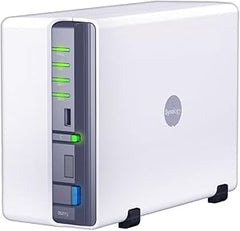
Synology BST150-4T BeeStation 4TB Personal Cloud Storage
Synology BeeStation offers 4TB of personal cloud storage with one-scan setup and no subscription fees.
View price on Amazon
Affiliate Disclosure: As an Amazon Associate, Studio Supplies earns from qualifying purchases made through links on this page, at no additional cost to you. This helps support our editorial team.
Notice a mistake? Let Us Know
Overview
Key Features
Scan a QR code to begin—no storage or network expertise required
Store, access, and share files over the web, or from your desktop or mobile devices
Share storage with family and friends so everyone has their own personalized storage space
Edit files on BeeStation from your desktop while keeping your progress synced across computers
Back up files from Google Drive, OneDrive, Dropbox, and external drives to one central place
Specifications
Brand
Synology
Model
BST150-4T
Storage Capacity
4TB
Connectivity
Ethernet
Setup Method
QR Code
Access Methods
Web, Desktop, Mobile
Multi-User Support
Yes (individual storage spaces)
Cloud Backup Sources
Google Drive, OneDrive, Dropbox, External Drives
File Syncing
Yes (across computers)
Compatible Devices
Laptop, Tablet, Smartphone
Similar Products
Other products from the same family that visitors often consider:
Frequently Asked Questions
How difficult is the Synology BeeStation to set up?
Setup is designed to be as simple as scanning a QR code with your phone. No networking or storage expertise is required to get started.
Does the BeeStation require a monthly subscription to use?
No. The BeeStation is a one-time purchase with 4TB of built-in storage. There are no recurring fees for storage, access, or syncing — you own your data and the hardware outright.
Can multiple people use a single BeeStation?
Yes. You can share storage with family members and friends, and each person gets their own personalized storage space with separate access to their files.
Can I back up files from other cloud services to the BeeStation?
Yes, the BeeStation supports backing up files from Google Drive, OneDrive, Dropbox, and external drives, consolidating everything into one central location.
Can I access my BeeStation files when I'm away from home?
Yes. You can store, access, and share files over the web or from desktop and mobile devices, so your files are available wherever you have an internet connection.
Related Products
