

Synology
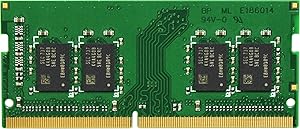
Synology D4NS2133-4G 4GB DDR3 SO-DIMM RAM Module
Synology-certified 4GB DDR3 SO-DIMM memory module for boosting NAS multitasking performance and application responsiveness.
Check availability
Affiliate Disclosure: As an Amazon Associate, Studio Supplies earns from qualifying purchases made through links on this page, at no additional cost to you. This helps support our editorial team.
Notice a mistake? Let Us Know
Overview
Key Features
Applied model: DS1618+
Warranty: 3 Year
For expanding your Synology NAS server's memory capacity
Specifications
Capacity
4GB
Memory Type
DDR3 SO-DIMM
Speed
2133MHz
Module Count
1
Brand
Synology
Model
D4NS2133-4G
Frequently Asked Questions
Which Synology NAS models are compatible with the D4NS2133-4G?
The D4NS2133-4G is designed for Synology NAS units that support DDR3 SO-DIMM memory at 2133MHz. Check Synology's compatibility list for your specific NAS model before purchasing, as not all models accept this module.
Why should I use a Synology-branded RAM module instead of a generic one?
Synology-branded modules are tested and validated for compatibility with Synology NAS hardware. Using third-party RAM can sometimes cause stability issues or may not be recognized by the system, and it may affect your Synology warranty coverage.
How does adding more RAM improve NAS performance?
Additional RAM in a Synology NAS allows smoother operation when running multiple packages (such as Surveillance Station, Docker, or virtual machines), speeds up file indexing, and improves caching performance for frequently accessed data.
Is this a single module or a kit of multiple modules?
This is a single 4GB DDR3 SO-DIMM module. If your NAS has multiple memory slots and you need more than 4GB, you would need to purchase additional modules separately.
Related Products


