



Synology
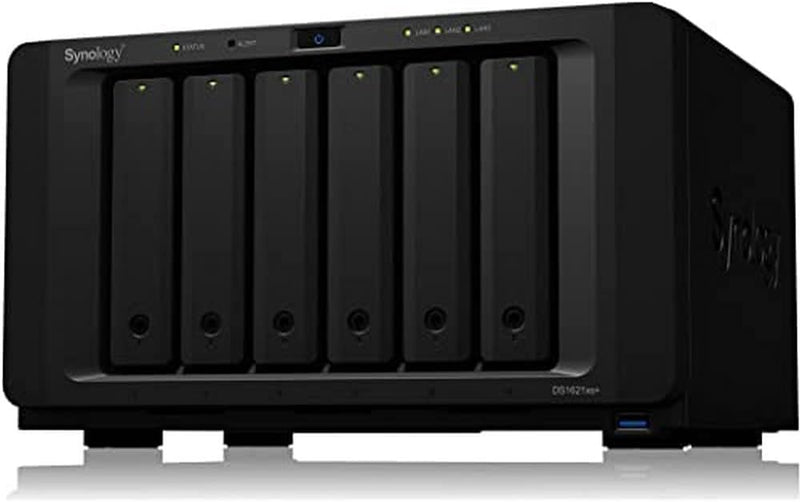
Synology DiskStation DS1621xs+ 6-Bay NAS (Diskless)
The DS1621xs+ delivers over 3,100 MB/s sequential read with built-in 10GbE and NVMe cache — SMB-grade NAS throughput that doesn't require a separate networking card to unlock.
$2,199.99*
Check availability
*Price sourced from Amazon.com. Last updated:Aug 28, 2026.Price and availability are subject to change — details.
Affiliate Disclosure: As an Amazon Associate, Studio Supplies earns from qualifying purchases made through links on this page, at no additional cost to you. This helps support our editorial team.
Notice a mistake? Let Us Know
Overview
Key Features
Combine built-in 10GbE and optional high-speed NIC for over 3,100 MB/s sequential read performance
Built-in M.2 2280 NVMe SSD slots permit cache acceleration without using storage drive bays
Flexibly scale up to 16 drives to increase storage capacity as demand grows
Back up critical data and reduce your Recovery Time Objective (RTO) with Snapshot Replication
Use virtualization storage tools to complete your SAN or run virtual machines on a full-featured hypervisor
Specifications
Drive Bays
6
Built-in 10GbE
Yes
M.2 NVMe SSD Slots
2 x M.2 2280 (cache only)
Max Drive Scalability
Up to 16 drives (with expansion units)
Sequential Read Performance
Over 3,100 MB/s (with optional high-speed NIC)
Operating System
Synology DSM 7
Virtualization
Virtual Machine Manager (VMM) supported
Backup Software
Active Backup for Business (included)
Frequently Asked Questions
What does the built-in 10GbE port actually change versus a standard NAS?
Standard NAS units with 1GbE top out at roughly 125 MB/s sustained transfer — a hard ceiling imposed by the network link, not the drives. The DS1621xs+'s built-in 10GbE port raises that ceiling to 1,250 MB/s, and combined with NVMe SSD cache and a high-speed NIC, Synology rates sequential read at over 3,100 MB/s. For users transferring large video files, running virtual machines, or serving multiple concurrent users, this eliminates the bottleneck that makes 1GbE NAS frustrating.
How do the M.2 NVMe SSD slots work without consuming drive bays?
The DS1621xs+ includes two dedicated M.2 2280 NVMe SSD slots on the motherboard, physically separate from the six 3.5-inch drive bays. These slots are exclusively for read/write cache acceleration via Synology's SSD Cache feature — they do not appear as usable storage volumes. By dedicating slots to cache instead of bays, you preserve the full six bays for spinning disk or SSD storage capacity.
Can this NAS be expanded beyond its 6 bays?
Yes — the DS1621xs+ supports Synology DX expansion units, scaling to 16 total drives. This expansion path matters for businesses that want to start with a 6-bay footprint and grow storage capacity without replacing the NAS unit. Note that expansion requires compatible Synology DX shelves connected via eSATA.
Is the DS1621xs+ suitable for running virtual machines directly?
Synology's Virtual Machine Manager (VMM) hypervisor runs on DSM 7 and is supported on the DS1621xs+. The unit can host guest VMs for light workloads — infrastructure services, test environments, edge computing tasks. For production virtualization workloads with multiple concurrent VMs under heavy load, a dedicated hypervisor host will outperform it, but for IT environments that want to consolidate NAS and basic VM hosting, it's a capable platform.
What backup and recovery capabilities are built in?
Snapshot Replication is included at the DSM level — snapshots can be taken at defined intervals with recovery time objective (RTO) measured in seconds for individual files or entire volumes. Hyper Backup supports off-site replication to cloud targets, remote Synology units, or rsync destinations. Active Backup for Business adds agentless backup for Windows endpoints and VMware environments without per-seat licensing fees.
Related Products
