



Synology
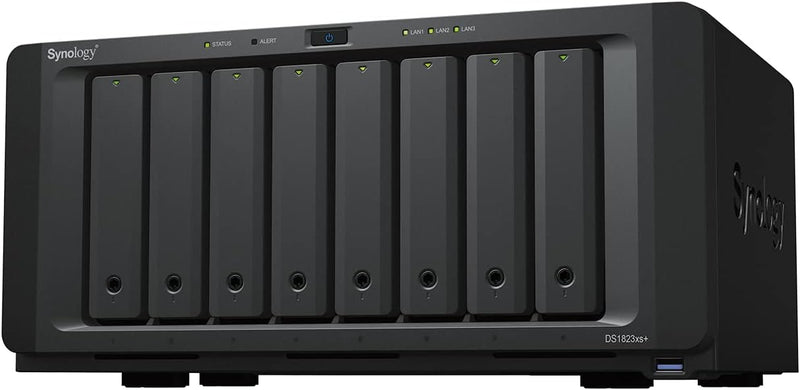
Synology DS1823xs+ 8-Bay DiskStation NAS (Diskless)
Unleash Scalable Performance for Data-Intensive TasksThe Synology DS1823xs+ is a high-performance 8-bay NAS designed for businesses needing robust storage and versatile application support. With its scalable architecture, comprehensive data protection features, and seamless integration with Synol...
$2,049.99*
View on Amazon
✓ In Stock on Amazon.com
*Price sourced from Amazon.com. Last updated:Aug 28, 2026.Price and availability are subject to change — details.
Affiliate Disclosure: As an Amazon Associate, Studio Supplies earns from qualifying purchases made through links on this page, at no additional cost to you. This helps support our editorial team.
Notice a mistake? Let Us Know
Overview
Unleash Scalable Performance for Data-Intensive Tasks
The Synology DS1823xs+ is a high-performance 8-bay NAS designed for businesses needing robust storage and versatile application support. With its scalable architecture, comprehensive data protection features, and seamless integration with Synology's ecosystem, it's an ideal solution for centralizing data management and enhancing productivity.
Specifications:
- Brand: Synology
- Model: DS1823xs+
- Number of Bays: 8
- Expansion: Up to 18 drive bays with 2 Synology DX517 Expansion Units
- Data Protection: License-free solutions for backup, replication, and recovery
- Uptime: Hot-swappable drives, online volume expansion, and Synology High Availability clustering
- Color: Black
Key Features
Attach up to 2 Synology DX517 Expansion Units for up to 18 drive bays
Protect your IT infrastructure with license free solutions for backup, replication, and recovery
Maximize uptime with hot-swappable drives, online volume expansion, and Synology High Availability clustering
Check Synology knowledge center or YouTube channel for help on product setup and additional information
Check the product specification page for the software or application you want to use
Specifications
Model
DS1823xs+
Drive Bays
8-Bay (Diskless)
Expandable Bays
Up to 18 (with 2x DX517 Expansion Units)
Backup Solutions
License-free backup, replication, recovery
Uptime Features
Hot-swappable drives, Online volume expansion, Synology High Availability clustering
Similar Products
Other products from the same family that visitors often consider:
 Currently Unavailable
Synology DiskStation DS1823xs+ 8-Bay NAS Server
Check on Amazon → Currently Unavailable
Synology DS1817 8-Bay NAS DiskStation (Diskless)
Check on Amazon → Currently Unavailable
Synology DS1815+ DiskStation 8-Bay NAS
Check on Amazon → ✓ Available
Synology RS1221RP+ 8-Bay RackStation NAS Diskless
$2,149.99
View on Amazon → ✓ Available
Synology RS1221+: 8-Bay RackStation NAS (Diskless)
$1,649.99
View on Amazon →Frequently Asked Questions
How many drive bays does the Synology DS1823xs+ support?
The Synology DS1823xs+ is an 8-bay DiskStation NAS, and it can be expanded with up to two Synology DX517 Expansion Units for a total of 18 drive bays.
Does this NAS include hard drives?
No, the Synology DS1823xs+ is sold as a diskless unit, meaning you will need to purchase and install hard drives separately.
What kind of data protection solutions does this NAS offer?
The DS1823xs+ supports license-free solutions for backup, replication, and recovery, designed to protect your IT infrastructure.
How does the DS1823xs+ maximize uptime?
This NAS is engineered to maximize uptime through features like hot-swappable drives, online volume expansion, and Synology High Availability clustering.
Where can I find help with product setup?
For assistance with product setup and additional information, you can check the Synology knowledge center or their YouTube channel.
Related Products
