



Thermaltake
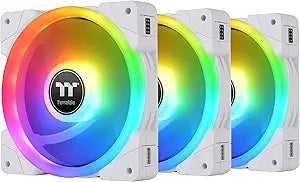
Thermaltake CL-F162-PL14SW-A SWAFAN EX 14 RGB Cooling Fan
USB 2.0
A 140mm RGB fan 3-pack with magnetic swappable blades, dedicated controller, and up to 81 CFM for serious airflow.
View price on Amazon
Affiliate Disclosure: As an Amazon Associate, Studio Supplies earns from qualifying purchases made through links on this page, at no additional cost to you. This helps support our editorial team.
Notice a mistake? Let Us Know
Overview
Key Features
Swappable Fan Blade Design and Neodymium Magnetic Connection
Supports up to 2000 RPM (Standard|Reverse) with up to 81 CFM for airflow
Includes: 3 140mm PWM Fans, 3 Reversable Blades, 3 Mag-cables, 1 controller and accessories
Requires 1 molex (Power) and 1 USB 2.0 Internal Header (Connectivity)
FREE TT RGB PLUS 2.0 Software download from website
Specifications
Brand
Thermaltake
Model
CL-F162-PL14SW-A
Fan Size
140 x 140 x 25 mm
Quantity
3-pack
Interface
USB 2.0 (9-pin), Molex power
Fan Speed
500–2,000 RPM (PWM)
Max Airflow (Standard Blade)
57.11 CFM
Max Airflow (Reverse Blade)
56.26 CFM
Max Air Pressure (Standard)
2.39 mm-H₂O
Max Air Pressure (Reverse)
2.02 mm-H₂O
Noise (Standard Blade)
30.6 dB-A
Noise (Reverse Blade)
32.5 dB-A
Bearing Type
Hydraulic bearing
Software
TT RGB PLUS 2.0 (free download)
OS Compatibility
Windows 10 / 11
Included
3 fans, 3 reversible blade sets, 3 magnetic cables, 1 controller, accessories
Similar Products
Other products from the same family that visitors often consider:
 ✓ Available
Thermaltake CL-F143 SWAFAN EX 12 RGB Cooling Fan 3-Pack
View on Amazon → Currently Unavailable
Thermaltake SWAFAN EX 12 White RGB Fan 3-Pack
Check on Amazon → ✓ Available
Thermaltake CL-F170-PL14SW-A SWAFAN EX 14 ARGB White Cooling Fan 3-Pack
View on Amazon → ✓ Available
Thermaltake CL-F167-PL12SW-A SWAFAN EX 12 ARGB PC Fan - 3 Pack
View on Amazon → ✓ Available
Thermaltake CL-F137-PL12SW-A SWAFAN 12 RGB Fan 3-Pack
View on Amazon →Frequently Asked Questions
How do the swappable blades work on the SWAFAN EX 14?
The fan blades connect via neodymium magnets, letting you tool-free swap between the included standard and reverse blade sets to change airflow direction without unmounting the fan from your case.
What connections does the SWAFAN EX 14 require?
The included controller needs one Molex connector for power and one internal USB 2.0 header (9-pin) for software communication. No motherboard fan headers are required for the fans themselves.
What software controls the RGB lighting and fan speeds?
The fans are managed through Thermaltake's free TT RGB PLUS 2.0 software, which is downloaded from their website. It provides control over lighting effects, fan speed curves, and monitoring.
Is this fan set compatible with my operating system?
The TT RGB PLUS 2.0 software requires Windows 10 or Windows 11. The fans will physically spin via the controller on any system, but software-based lighting and speed control needs a compatible Windows installation.
What is the difference between the standard and reverse fan blades?
Both blade types spin at the same RPM range, but they push air in opposite directions. The standard blades deliver slightly higher air pressure (2.39 vs 2.02 mm-H₂O) and marginally lower noise (30.6 vs 32.5 dB-A) compared to the reverse blades.
Related Products


