



Thermaltake
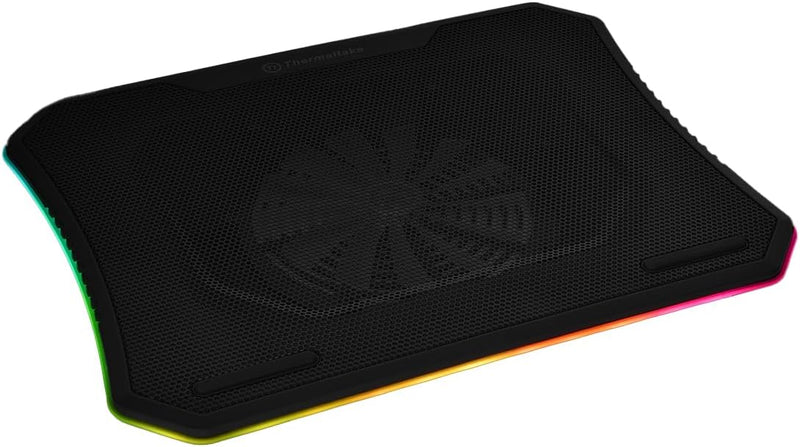
Thermaltake CL-N014-PL20SW-A Massive 20 RGB Laptop Cooling Pad
Cool your gaming laptop with a massive 200mm RGB fan, steel mesh airflow, and three ergonomic height settings.
$59.99*
View on Amazon
✓ In Stock on Amazon.com
*Price sourced from Amazon.com. Last updated:Aug 29, 2026.Price and availability are subject to change — details.
Affiliate Disclosure: As an Amazon Associate, Studio Supplies earns from qualifying purchases made through links on this page, at no additional cost to you. This helps support our editorial team.
Notice a mistake? Let Us Know
Overview
Key Features
Set lights and fan speeds effortlessly: Control lights and fan easily via the built‐in control panel including light mode button, color mode button and fan speed knob
Supreme ventilation: Steel mesh surface with an integrated 200 millimeter silent fan for optimal airflow and high thermal performance
Ergonomic comfort: Ergonomically designed with 3 adjustable height settings (3°/ 9° /13°) for the best viewing and typing angle
Designed for 19 inches gaming notebooks: Utilized a large metal mesh surface to support up to 19 inches gaming laptops
Specifications
Brand
Thermaltake
Model
CL-N014-PL20SW-A
Fan Size
200mm (Single)
Lighting
256 Colors RGB, 5 Light Modes
Laptop Compatibility
10–19 inches
Surface Material
Steel Mesh
Height Adjustment
3 Settings (3° / 9° / 13°)
Construction
Plastic
Dimensions
18.5 x 14 x 1.5 inches
Weight
3.38 pounds
Frequently Asked Questions
What size laptops does the Massive 20 RGB support?
It supports laptops ranging from 10 inches to 19 inches, making it compatible with most gaming notebooks and standard laptops.
How do I control the RGB lighting and fan speed?
A built-in control panel on the pad includes a light mode button, a color mode button, and a fan speed knob for quick adjustments without any software.
How many height adjustment positions does this cooling pad offer?
It provides three ergonomic height settings at 3°, 9°, and 13° angles to suit different typing and viewing preferences.
Is the fan noisy during use?
The 200mm fan is designed to operate quietly. Larger fans can spin at lower RPMs while moving the same amount of air as smaller fans, which helps keep noise levels down.
Does the cooling pad require external power?
It draws power through a USB connection to your laptop, so no separate power adapter is needed.
Related Products

