

Thermaltake
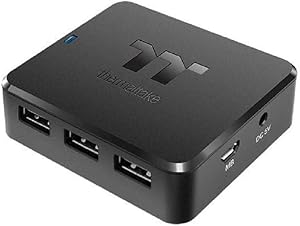
Thermaltake PS-ACC-IU2H00R-1 H200 Internal USB Hub Black
USB 2.0
Expand Your Internal USB Connectivity Introducing the Thermaltake H200 Internal USB Hub, the ideal solution for expanding your internal USB connectivity. Easily connect and manage your components with this simple, reliable, and magnetically mounted hub. Specifications: Brand: Thermaltake Model...
View price on Amazon
Affiliate Disclosure: As an Amazon Associate, Studio Supplies earns from qualifying purchases made through links on this page, at no additional cost to you. This helps support our editorial team.
Notice a mistake? Let Us Know
Overview
Expand Your Internal USB Connectivity
Introducing the Thermaltake H200 Internal USB Hub, the ideal solution for expanding your internal USB connectivity. Easily connect and manage your components with this simple, reliable, and magnetically mounted hub.
Specifications:
- Brand: Thermaltake
- Model: PS-ACC-IU2H00R-1
- Type: Internal USB Hub
- Color: Black
- Connections: 3x USB 2.0 (9Pin), 3x USB 2.0 (Type-A)
- Mounting: Magnetic
Key Features
Connectors: 3x USB 2.0 (9Pin) and 3x USB 2.0 (Type-A)
Easy installation by a magnet
SATA power cable provides sufficient power
Specifications
Product Type
Internal USB Hub
Brand
Thermaltake
Internal USB Connectors
3x USB 2.0 (9Pin)
External USB Connectors
3x USB 2.0 (Type-A)
Installation Method
Magnet
Power Source
SATA power cable
Color
Black
Frequently Asked Questions
What type of USB ports does the Thermaltake H200 Internal USB Hub provide?
The Thermaltake H200 hub provides three internal USB 2.0 (9Pin) connectors and three external USB 2.0 (Type-A) connectors.
How is the Thermaltake H200 Internal USB Hub installed?
This internal USB hub features an easy installation method using a magnet, allowing it to be securely placed inside your PC case.
How does the hub receive power for connected devices?
The Thermaltake H200 Internal USB Hub utilizes a SATA power cable to ensure it receives sufficient power for all devices connected to it.
Can this hub be used for external USB connections?
No, the Thermaltake H200 is designed as an internal USB hub, intended to expand USB connectivity within your PC case.
What is the advantage of having internal 9-pin USB connectors?
The internal 9-pin USB 2.0 connectors allow you to connect components like RGB controllers or liquid coolers that typically require these motherboard headers.
Is the installation tool-free?
Yes, the magnetic installation of the Thermaltake H200 means that tools are generally not required to secure it in place within your PC case.
Related Products

