



Toshiba
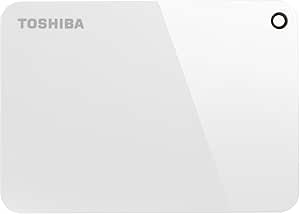
Toshiba HDTC930EW3CA 3TB Canvio Advance External Drive
USB 3.0
A sleek 3TB portable hard drive with USB 3.0 speed and automatic backup software included.
Check availability
Affiliate Disclosure: As an Amazon Associate, Studio Supplies earns from qualifying purchases made through links on this page, at no additional cost to you. This helps support our editorial team.
Notice a mistake? Let Us Know
Overview
Key Features
2.5" external hard drive
Glossy piano finish
SuperSpeed USB 3.0
USB-powered
Auto-backup software
Specifications
Brand
Toshiba
Model
HDTC930EW3CA
Capacity
3TB
Form Factor
2.5-inch Portable
Interface
SuperSpeed USB 3.0
Power
USB Bus-Powered
Finish
Glossy Piano Finish
Included Software
Auto-Backup Software
Frequently Asked Questions
Is the Toshiba Canvio Advance compatible with Mac computers?
The drive comes pre-formatted for Windows (NTFS), but it can be reformatted to exFAT or HFS+ for use with Mac. Reformatting will erase the included backup software, which is Windows-only.
Does the Canvio Advance require an external power adapter?
No, the drive is entirely USB-powered. It draws all necessary power through the USB cable connected to your computer — no separate power supply is needed.
What backup software is included with the drive?
Toshiba includes auto-backup software that lets you schedule automatic file backups from your PC to the drive, so your important files are continuously protected without manual intervention.
Is the USB 3.0 connection backward compatible with USB 2.0 ports?
Yes, the Canvio Advance works with USB 2.0 ports, though transfer speeds will be limited to USB 2.0 rates. For full performance, connect to a USB 3.0 port.
How durable is the glossy piano finish?
The glossy finish gives the drive an elegant appearance but is prone to showing fingerprints and minor scratches more readily than matte-finished drives.
Related Products
