



Toshiba
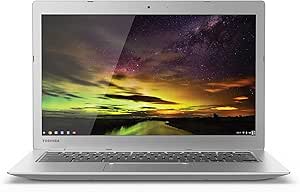
Toshiba CB35-B3330 Chromebook 2 13.3" Celeron 16GB SSD
16GB SSD
A lightweight 13.3" Chromebook built for everyday browsing, streaming, and schoolwork at a budget-friendly price.
Check availability
Affiliate Disclosure: As an Amazon Associate, Studio Supplies earns from qualifying purchases made through links on this page, at no additional cost to you. This helps support our editorial team.
Notice a mistake? Let Us Know
Overview
Key Features
More for the money with this high quality Product
Offers premium quality at outstanding saving
Excellent product
100% satisfaction
Specifications
Brand
Toshiba
Model
CB35-B3330
Display
13.3"
Processor
Intel Celeron N2840 2.16GHz
Memory
2GB DDR3L 1600MHz
Storage
16GB SSD
Operating System
Chrome OS
Frequently Asked Questions
What processor does the Toshiba Chromebook 2 CB35-B3330 use?
It runs an Intel Celeron N2840 dual-core processor clocked at 2.16GHz, suitable for web browsing, document editing, and light multitasking.
Can I install Windows or other desktop applications on this Chromebook?
No, this Chromebook runs Chrome OS, which relies on web apps and Android apps from the Google Play Store rather than traditional desktop software.
Is 16GB of SSD storage enough?
For a Chromebook that stores most files in Google Drive and runs web-based apps, 16GB covers the operating system and a modest number of offline files, but you may need to rely on cloud storage for larger media libraries.
How much RAM does this model have?
It comes with 2GB of DDR3L RAM, which handles basic browsing and single-app use but may struggle with many open tabs simultaneously.
Is the storage or RAM upgradeable?
No, the 16GB SSD and 2GB RAM are soldered to the motherboard and cannot be upgraded.
Related Products


