

Toshiba
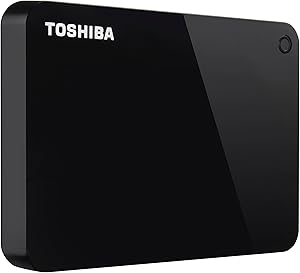
Toshiba HDTC910XK3AA Canvio Advance 1TB External HDD
Storage That Keeps Pace with Your Life The Toshiba Canvio Advance Portable External Hard Drive provides reliable and high-capacity storage in a sleek and compact design. Ideal for backing up your important files or expanding your storage on the go, this hard drive offers seamless USB 3.0 connect...
Check availability
Affiliate Disclosure: As an Amazon Associate, Studio Supplies earns from qualifying purchases made through links on this page, at no additional cost to you. This helps support our editorial team.
Notice a mistake? Let Us Know
Overview
Storage That Keeps Pace with Your Life
The Toshiba Canvio Advance Portable External Hard Drive provides reliable and high-capacity storage in a sleek and compact design. Ideal for backing up your important files or expanding your storage on the go, this hard drive offers seamless USB 3.0 connectivity and advanced security features.
- Capacity: 1TB
- Interface: USB 3.0
- Form Factor: 2.5"
- Security: Password protection
- Color: Black
Key Features
Compact design with four vibrant color options to fit your lifestyle
Up to 4TB of storage capacity to store your growing files and content
Toshiba storage backup software (downloadable) to easily back up your content and schedule your backup to run automatically
Toshiba storage security software (downloadable) to help prevent unauthorized access to your data with a password lock feature
Includes Toshiba 2 year standard limited
Specifications
Model
Canvio Advance
Capacity
1TB (up to 4TB options available)
Color Options
Four vibrant colors
Included Software
Toshiba Storage Backup Software (downloadable), Toshiba Storage Security Software (downloadable)
Warranty
Toshiba 2 year standard limited
Frequently Asked Questions
What is the maximum storage capacity available for the Toshiba Canvio Advance?
The Toshiba Canvio Advance external HDD is available with up to 4TB of storage capacity, though this specific model is 1TB.
Does this external hard drive come with any security features?
Yes, it includes downloadable Toshiba Storage Security Software that features a password lock to help prevent unauthorized access to your data.
Can I set up automatic backups with the Toshiba Canvio Advance?
Yes, by downloading the Toshiba Storage Backup Software, you can easily back up your content and schedule backups to run automatically.
What kind of warranty is offered with this Toshiba external HDD?
The Toshiba Canvio Advance comes with a Toshiba 2-year standard limited warranty.
Are there different color options available for this hard drive?
Yes, the Toshiba Canvio Advance is designed with four vibrant color options to allow for personalization.
What type of connection does this external hard drive use?
The specific interface type is not detailed, but most modern external HDDs use a USB connection for data transfer and power.
Is the backup software pre-installed on the drive?
No, the Toshiba storage backup software and security software are downloadable and need to be installed by the user.
Related Products
