
Toshiba
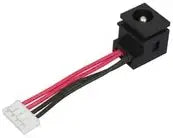
Toshiba P000453620 Tecra M5 DC-IN Harness
A direct-fit DC-IN harness replacement that restores reliable power delivery to your Toshiba Tecra M5 laptop.
View price on Amazon
Affiliate Disclosure: As an Amazon Associate, Studio Supplies earns from qualifying purchases made through links on this page, at no additional cost to you. This helps support our editorial team.
Notice a mistake? Let Us Know
Overview
Ensure Reliable Power Delivery
Introducing the Toshiba Tecra M5 DC-IN Harness. This essential component ensures a stable power connection for your Toshiba Tecra M5 laptop, maintaining consistent performance.
- Part #: P000453620
- Compatibility: Toshiba Tecra M5
Frequently Asked Questions
What does this DC-IN harness actually do?
It is the internal wiring harness that connects your laptop's power jack to the motherboard. If this component fails or develops a loose connection, the laptop may not charge or may lose power intermittently.
How do I know if my Tecra M5 needs a new DC-IN harness?
Common symptoms include the laptop only charging when the power plug is held at a certain angle, intermittent power loss, or complete failure to recognize the AC adapter despite the adapter working correctly.
Is this harness compatible with other Toshiba laptop models?
No, the P000453620 is specifically designed for the Toshiba Tecra M5. It will not fit other Toshiba models due to differences in connector routing and pin configuration.
Does installing this part require soldering?
Typically no soldering is required. The DC-IN harness connects via a plug to the motherboard, though disassembly of the laptop chassis is necessary to access and replace it.
Related Products

