

Toshiba
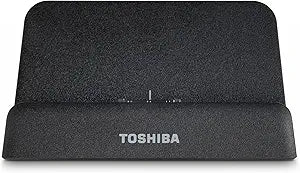
Toshiba PA3934U-1PRP Thrive Tablet Multi-Dock HDMI
Transform Your Toshiba Tablet ExperienceIntroducing the Toshiba PA3934U-1PRP Thrive Multi-Dock, engineered to enhance the functionality of your Toshiba 10" Tablet. This multi-dock not only charges your device but also facilitates seamless connectivity to external displays and accessories for a ri...
$9.99*
View on Amazon
✓ In Stock on Amazon.com
*Price sourced from Amazon.com. Last updated:Aug 30, 2026.Price and availability are subject to change — details.
Affiliate Disclosure: As an Amazon Associate, Studio Supplies earns from qualifying purchases made through links on this page, at no additional cost to you. This helps support our editorial team.
Notice a mistake? Let Us Know
Overview
Transform Your Toshiba Tablet Experience
Introducing the Toshiba PA3934U-1PRP Thrive Multi-Dock, engineered to enhance the functionality of your Toshiba 10" Tablet. This multi-dock not only charges your device but also facilitates seamless connectivity to external displays and accessories for a richer multimedia and productivity experience.
- HDMI Output: Connect to your HDTV or LCD monitor to enjoy full HD content up to 1080p.
- USB 2.0 Ports: Features two USB 2.0 ports for connecting peripherals like keyboards, mice, or external storage.
- 3.5mm Audio Out: Enhance your audio experience by connecting headphones or external speakers.
- Optimized Viewing Angle: Designed with an angled orientation ideal for watching movies, browsing the web, and more.
- Easy Docking: Top-load proprietary connector ensures docking and undocking your tablet is simple and secure.
- Landscape Mode Stand: Designed specifically for use with Toshiba Tablets in landscape orientation.
Key Features
Landscape mode stand Designed exclusively for Toshiba Tablet
Use of docking station reduces wear-and-tear on Tablets ports and cable plugs
Easy access to Tablet's built-in ports, for even more connectivity
Safely charge your Tablet using the AC Adapter included with the Toshiba Tablet
Easily connect to your HDTV or LCD monitor and view HD content up to 720p through the HDMI port
Designed exclusively for Toshiba Tablet Landscape mode stand
Easily connect to your HDTV or LCD monitor and view HD content up to 720p through the HDMI port (HDMI cable not included)
Hot-swappable; add or remove most devises without rebooting the tablet
Easy access to Tablet's built-in ports, for even more connectivity
Additional AC adapter also available for separate purchase (part number PA3922U-1ARA)
Specifications
Brand
Toshiba
Model
PA3934U-1PRP
Compatibility
Toshiba Tablet (exclusive)
Orientation
Landscape mode stand
Video Output
HDMI (up to 720p)
Charging Method
Uses Toshiba Tablet's AC Adapter
Connectivity
Easy access to Tablet's built-in ports
Feature
Hot-swappable
Frequently Asked Questions
Is the Toshiba Thrive Tablet Multi-Dock compatible with all tablets?
No, this multi-dock is designed exclusively for Toshiba Tablets, ensuring a precise fit and optimal functionality with those specific devices.
Can I connect my Toshiba Tablet to an external display using this dock?
Yes, the dock features an HDMI port that allows you to easily connect your Toshiba Tablet to an HDTV or LCD monitor, supporting HD content up to 720p.
Does the dock come with an HDMI cable?
No, the HDMI cable needed for connecting to an external display is not included with the multi-dock and must be purchased separately.
How does this dock help protect my tablet's ports?
By providing a central point for connections, the use of this docking station reduces the frequency of plugging and unplugging directly into the tablet's ports, thereby reducing wear-and-tear.
Is the Toshiba Thrive Tablet Multi-Dock hot-swappable?
Yes, the multi-dock is hot-swappable, which means you can add or remove most devices without needing to reboot your tablet.
Related Products

