
Toshiba
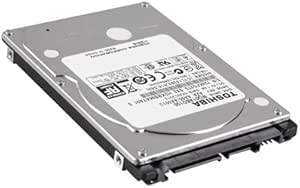
Toshiba PSE10U Satellite 1TB Laptop Hard Drive
Reliable Storage Upgrade for Your LaptopUpgrade your laptop's storage with the Toshiba Satellite E105-S1402 (PSE10U) Hard Drive. This 1TB SATA drive provides ample space for your files and applications, ensuring smooth performance and dependable storage. Capacity: 1TB Interface: SATA ...
Check availability
Affiliate Disclosure: As an Amazon Associate, Studio Supplies earns from qualifying purchases made through links on this page, at no additional cost to you. This helps support our editorial team.
Notice a mistake? Let Us Know
Overview
Reliable Storage Upgrade for Your Laptop
Upgrade your laptop's storage with the Toshiba Satellite E105-S1402 (PSE10U) Hard Drive. This 1TB SATA drive provides ample space for your files and applications, ensuring smooth performance and dependable storage.
- Capacity: 1TB
- Interface: SATA
- Speed: 5400RPM
- Form Factor: 2.5in
- Height: 9.5mm
- Compatibility: Toshiba Satellite E105-S1402 (PSE10U)
Key Features
Size: 2.5", 9.5mm height
Speed: 5400RPM, 12ms seek
Interface: Serial ATA 2.6/ATA-8
Transfer Rate: Up to 3.0GB/sec
Specifications
Capacity
1TB
Size
2.5"
Height
9.5mm
Speed
5400RPM
Seek Time
12ms
Interface
Serial ATA 2.6/ATA-8
Transfer Rate
Up to 3.0GB/sec
Frequently Asked Questions
Is this hard drive compatible with all laptops?
This hard drive features a 2.5" size and 9.5mm height, which are standard specifications for many laptops. However, it's essential to check your laptop's specific requirements for hard drive size and interface to ensure compatibility.
What is the advantage of a 5400RPM hard drive for a laptop?
A 5400RPM hard drive typically offers a good balance between storage capacity, affordability, and power consumption, which can contribute to longer battery life in laptops compared to faster, more power-intensive drives.
How does the "12ms seek" time impact performance?
The 12ms seek time refers to the average time it takes for the read/write heads to locate a data track on the platter. While suitable for general use, it means longer access times compared to SSDs, affecting application launch speeds and file retrieval.
Can this drive be used as an external hard drive?
This is an internal laptop hard drive. To use it as an external drive, you would need a separate 2.5" external hard drive enclosure with a compatible interface.
What is the maximum sustained data transfer rate for this drive?
The stated transfer rate is "Up to 3.0GB/sec," which refers to the theoretical maximum interface speed. Actual sustained transfer rates will depend on system configuration and workload and are generally lower than the burst rate.
Related Products

