



Toshiba
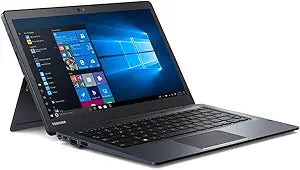
Toshiba Portege X30T-E3144 Touchscreen Tablet
A versatile Toshiba 2-in-1 touchscreen tablet built for intuitive interaction and portable productivity.
View price on Amazon
Affiliate Disclosure: As an Amazon Associate, Studio Supplies earns from qualifying purchases made through links on this page, at no additional cost to you. This helps support our editorial team.
Notice a mistake? Let Us Know
Overview
Key Features
13. 3" diagonal widescreen
Specifications
Brand
Toshiba
Model
Portege X30T-E3144 (PT17AU-02C004)
Form Factor
2-in-1 Detachable Tablet
Operating System
Windows 8.1
Touchscreen
Yes
Frequently Asked Questions
Does the Toshiba Portege X30T-E3144 come with a detachable keyboard?
The Portege X30T series features a detachable keyboard design, allowing it to function as both a tablet and a laptop depending on your needs.
Can the operating system be upgraded from Windows 8.1?
While the device ships with Windows 8.1, it may be eligible for an upgrade to Windows 10 depending on hardware driver availability. Check Toshiba's support page for compatible drivers before upgrading.
How responsive is the touchscreen on this tablet?
The Portege X30T-E3144 supports multi-touch gestures including tap, pinch-to-zoom, and swipe, providing a fluid touch experience for navigating Windows and compatible applications.
Is the Toshiba Portege X30T-E3144 suitable for digital note-taking or drawing?
The touchscreen supports basic touch input for note-taking apps, though for precision drawing you would want to confirm stylus compatibility and pressure sensitivity for your specific use case.
Related Products


