

Toshiba
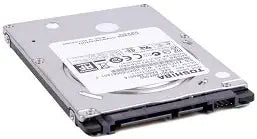
Toshiba SVE17122CXB 500GB Laptop Hard Drive Replacement
Toshiba 500GB 2.5-inch laptop hard drive offers a straightforward storage upgrade with a slim 7mm profile.
Check availability
Affiliate Disclosure: As an Amazon Associate, Studio Supplies earns from qualifying purchases made through links on this page, at no additional cost to you. This helps support our editorial team.
Notice a mistake? Let Us Know
Overview
Key Features
Size: 2.5", 7mm height
Speed: 5400RPM, 12ms seek
Interface: Serial ATA 2.6/ATA-8
Transfer Rate: Up to 3.0GB/sec
Specifications
Capacity
500 GB
Interface
SATA
Spindle Speed
5400 RPM
Form Factor
2.5 inch
Thickness
7mm
Frequently Asked Questions
What laptops is this 500GB drive compatible with?
This 2.5-inch SATA drive with a 7mm thickness is compatible with most laptops that accept standard 2.5-inch SATA hard drives, including the Sony VAIO SVE17122CXB it is listed as a replacement for.
What is the spindle speed, and how does that affect performance?
The drive spins at 5400RPM, which is standard for laptop hard drives. It prioritizes lower power consumption and quieter operation over maximum speed.
Will this drive work without a spacer in a 9.5mm drive bay?
At 7mm thick, it will physically fit in a 9.5mm bay but may sit loosely without a spacer adapter. Many laptop bays include padding or a bracket that accommodates the thinner profile.
Does this drive come formatted and ready to use?
Hard drives typically need to be formatted and partitioned after installation. You will need to install an operating system or clone your existing drive to use it as a boot drive.
Related Products
